CONTENT REFRESH

Improve the pages you already have - instead of always creating new ones.

Rankvia checks your existing website before recommending a new page. When an existing URL already owns the opportunity, Rankvia can recommend improving that page instead - using search demand, AI visibility, business context and existing-page evidence to decide where the work belongs.

Sign up or sign in, complete eligible website analysis and approve the reviewed Business Profile. Rankvia decides whether Create or Improve fits; this is not an instant article-URL assessment.

CREATE OR IMPROVE

See whether the opportunity belongs on a new page - or one you already have.

Rankvia checks the opportunity against the existing site before deciding where the work belongs.

  • Existing-page ownership
  • Create or Improve recommendation
  • Evidence behind the decision
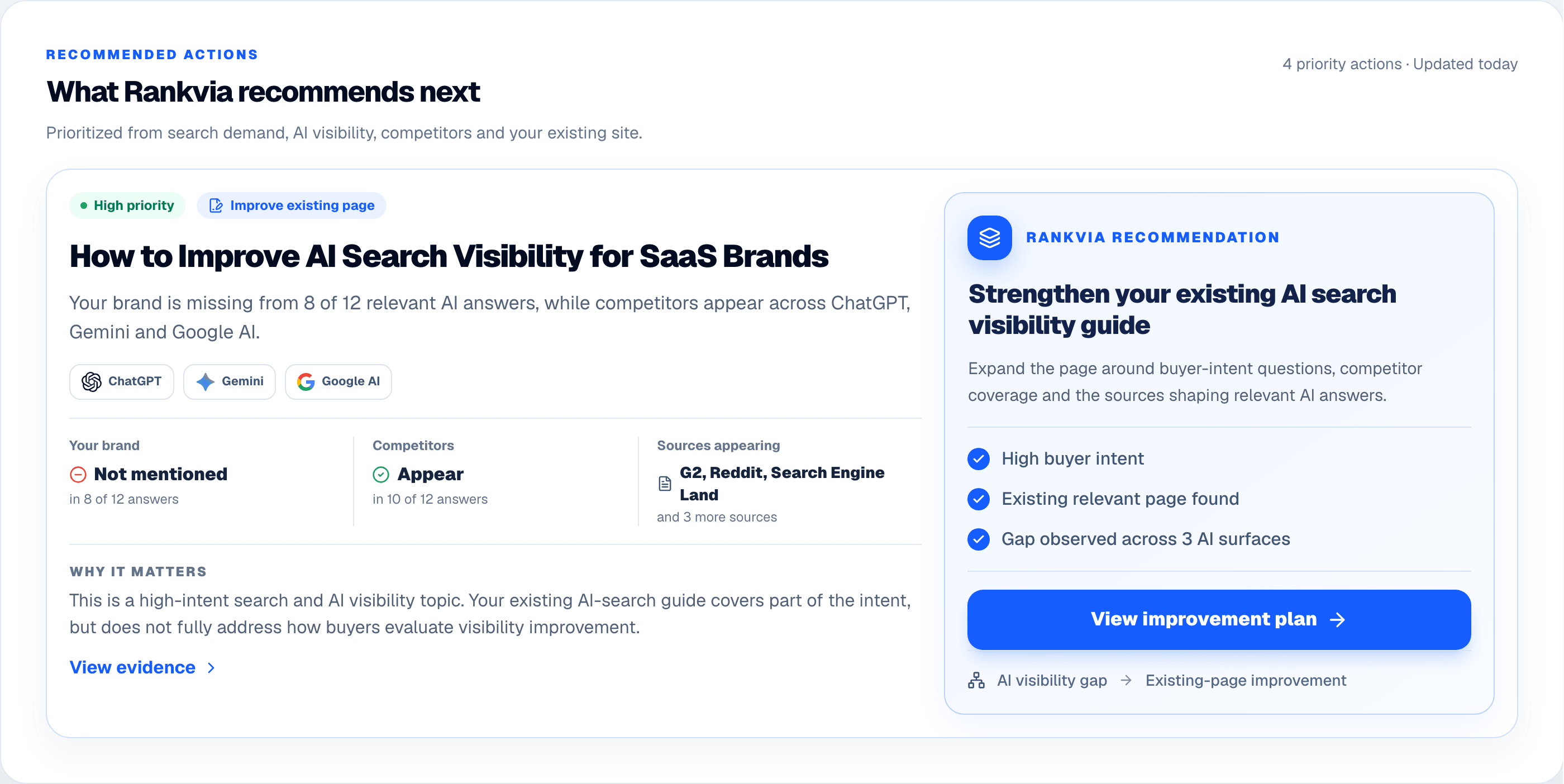
Rankvia recommended action showing an AI visibility gap and an existing-page improvement recommendation.
Product interface demonstration with illustrative data. Not a live Northtrail assessment or saved refresh result.

ILLUSTRATIVE EXAMPLE

A useful revision can be saved. A weaker rewrite should be rejected.

Northtrail is a fictional backpack store; these excerpts, proposed changes and decisions were written and edited to illustrate editorial judgement, not generated by Rankvia or taken from a real assessment.

Assume the fictional store sells Weekender 28L and Journey 40L backpacks and packing cubes. Review each page against its own reader task. We collected no search-volume, Search Console or AI-answer data for these cases.

Case A: an existing laptop-fit guide has a real gap

The guide already owns the question “How do I check whether my laptop fits?” Its useful measuring advice should stay, but its conclusion makes unsupported compatibility claims. Assume the merchant can supply current compartment measurements; the example does not supply real product specifications.

Original excerpt

Measure your laptop before choosing a backpack. Both Northtrail bags fit any laptop, so you can select either size without checking the compartment.

Proposed editorial excerpt

Measure the device you intend to carry and compare it with the current internal compartment dimensions for the specific bag. A screen diagonal alone does not establish fit. If you use a case or sleeve, check that combination too. The Weekender 28L and Journey 40L capacity labels describe the whole bag, not proof of laptop compatibility. If the product information does not resolve fit, ask the store before ordering.
  • Keep the original measuring task and the existing URL; do not create another laptop-fit article.
  • Replace the unsupported universal claim with a check the reader can perform, conditional on verified merchant measurements.
  • Place a descriptive link to each verified compartment specification where the reader compares dimensions, and retain useful instructions already present.

Hypothetical decision

This proposed refresh corrects an important claim and gives the reader a useful way to decide. Verify the product facts before accepting it. In Rankvia, a refreshed draft must pass the improvement checks before it can be saved for review.

Case B: a useful packing-cube explanation should stay

The existing page correctly explains what packing cubes do, has working links and remains the right owner. Its age alone provides no reason to rewrite it. The alternative below adds promises while removing the original practical check.

Original excerpt

Packing cubes group items inside a bag. They do not change the bag’s stated capacity. Compare the cube dimensions with the usable space and try your intended packing arrangement before relying on it for a trip.

Proposed editorial excerpt

Packing cubes transform every trip by creating extra capacity and ensuring your backpack meets airline requirements. Choose the largest set for effortless travel.
  • The proposal invents extra capacity and universal airline suitability without evidence.
  • It loses the useful dimension and packing-arrangement checks.
  • More confident wording, a longer introduction or a newer date would not repair those regressions.

Hypothetical decision

Retain the original in this hypothetical editorial review. Rejecting this proposal is a useful outcome, not a failed obligation to rewrite an old page. Investigate separately if new facts later show a real problem; an unavailable AI check or a brief traffic dip is not a diagnosis.

How Improve protects the original

When you generate an Improve draft, Rankvia compares it with the original page. It checks whether the changes add useful substance, preserve the original strengths and purpose, complete the planned changes and support claims without introducing new problems. The proposal can pass to review, be revised once or be rejected in favour of the original.

Rankvia saves the refreshed draft only when it has verified an improvement and the other checks pass. If verification is missing or the draft still fails after one requested revision, Rankvia keeps the original.

Review product claims, meaning, links and metadata before publication; these checks cannot guarantee accuracy or better performance. A higher word count alone does not mean a better article. Saving a refreshed draft does not publish it or change other pages in your CMS.

Start with website planning: sign up or sign in, complete website analysis, then review and approve your Business Profile. Free-preview eligibility applies. Rankvia considers whether an opportunity calls for Create, Improve or another action; this is not an instant check of any article URL. Search Console is optional.

Use the process that fits your page

MORE CONTENT ISN'T ALWAYS THE ANSWER

Creating another URL can make the website worse, not better.

A new opportunity does not automatically need a new page. When an existing page already serves the same buyer need, another URL can fragment coverage instead of strengthening the page that should own it.

CREATE EVERYTHING

Opportunity New page

Overlapping intent · Fragmented coverage · Unnecessary URLs

RANKVIA

Opportunity Check owner Create or Improve

Clearer ownership · Less content sprawl · Stronger existing pages

SIGNALS BEHIND THE DECISION

Use search and AI evidence to decide whether an existing page should own the opportunity.

SEARCH DEMAND

Query-level demand · Related questions

AI VISIBILITY

Buyer-question gaps · Competitor appearances · Observed cited sources

EXISTING WEBSITE

Current page ownership · Existing coverage · Business context · Internal links

Search + AI evidence + existing website

Rankvia prioritization

Create or Improve

AI Visibility can reveal a gap, but Rankvia still checks search demand, business fit and existing-page ownership before deciding the right response.

Optional Search Console evidence. Google Search Console can add first-party query, page and performance evidence when connected.

IMPROVE IN THE CONTENT CALENDAR

Create and Improve opportunities belong in the same plan.

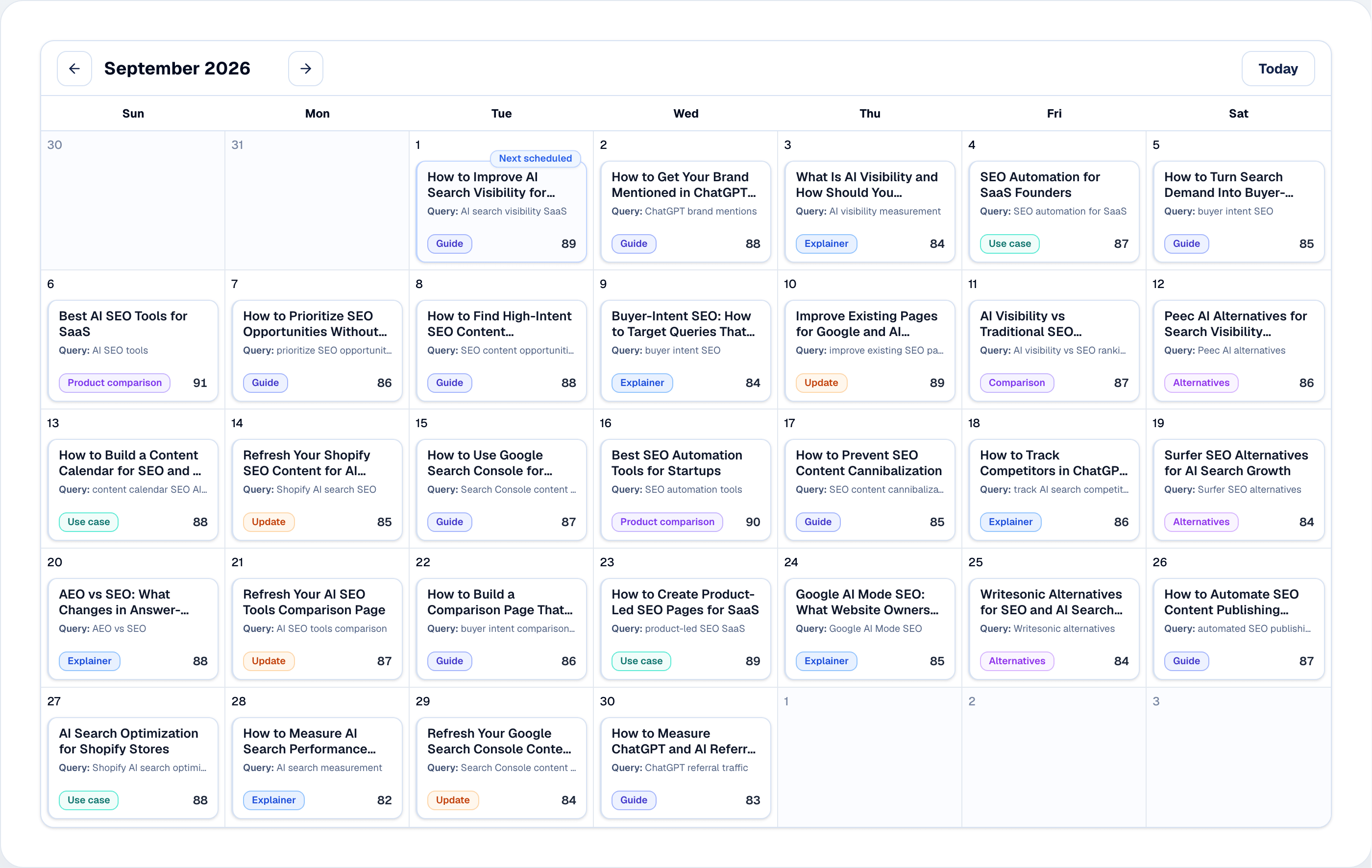
Rankvia schedules new pages and existing-page improvements together, so the calendar reflects the best next action - not just more URLs.

  • Create and Improve in one plan
  • Existing pages stay visible as owners
  • Publishing order stays prioritized
Rankvia Content Calendar showing a scheduled month of mixed search and AI search opportunities.
Product interface demonstration with illustrative data. Not a live Northtrail assessment or saved refresh result.

PLAN THE IMPROVEMENT

Know what should change before rewriting the page.

Rankvia turns the existing URL and the new opportunity into an improvement-focused Page Plan before generation begins.

  • Existing page remains the target
  • Target search need
  • Improvement objective
  • Internal-link context
Rankvia Improvement Page Plan for an existing SEO Content Calendar page, showing the Improve action, existing URL, search need, and improvement strategy.
Product interface demonstration with illustrative data. Not a live Northtrail assessment or saved refresh result.

PRESERVE WHAT ALREADY WORKS

Improve the page without throwing away useful context.

Keep useful context

Preserve relevant explanations and business information.

Keep strong positioning

Do not lose what already works for the business.

Expand missing coverage

Add what the opportunity requires.

Improve weak sections

Strengthen outdated or incomplete areas.

This does not guarantee surgical section-by-section preservation.

FROM IMPROVEMENT PLAN TO REVISED PAGE

Strengthen the page without starting from a blank prompt.

Rankvia uses the existing page, the improvement Page Plan and the broader business context to generate revised content that better serves the opportunity.

  • Existing URL stays the target
  • Current page remains context
  • Missing coverage is expanded
  • Review before publishing
Rankvia editor showing a revised SEO Content Calendar page, its improvement plan, metadata, and review controls.
Product interface demonstration with illustrative data. Not a live Northtrail assessment or saved refresh result.

BUSINESS-AWARE IMPROVEMENT

The revised page still needs to fit the business.

Rankvia keeps the Business Profile, positioning and relevant internal context available during improvement.

ONE CONTENT PLAN

New pages and existing-page improvements belong in the same workflow.

The plan reflects what the website actually needs next.

THE WEBSITE CHANGES THE ACTION

The same opportunity can lead to two different recommendations.

WEBSITE A

No relevant owner

CREATE

WEBSITE B

Meaningful existing ownership

IMPROVE

The opportunity may be the same. The existing website changes the action.

OPPORTUNITY-DRIVEN

Improve pages when the opportunity calls for it.

Rankvia does not continuously rewrite old pages just because they are old. Improve starts from a current opportunity and page ownership.

A planned improvement, not recurring rewriting

No continuous content-decay monitoring, automatic historical refresh, or ranking-recovery guarantee.

OUTCOMES

What the Improve workflow changes

Strengthen the right page when the website already has the better owner for the search opportunity.

Clearer page ownership

Know when an existing URL should own the opportunity.

Less content sprawl

Avoid unnecessary new URLs.

Improvement with a plan

Know what the existing page should accomplish next.

One connected Calendar

Manage Create and Improve work together.

Need a new page instead? Explore Content Creation

FAQ

Content refresh in Rankvia

START WITH YOUR WEBSITE

See whether your next opportunity belongs on a new page - or one you already have.

Start with your website, search opportunities and AI Visibility - then see where Rankvia recommends creating or improving.

Sign up or sign in, complete eligible website analysis and approve the reviewed Business Profile. Rankvia decides whether Create or Improve fits; this is not an instant article-URL assessment.