PAGE PLANS FOR SEO AND AI SEARCH

Plan what each page should achieve before generating it.

A Rankvia Page Plan turns a prioritized search opportunity into a strategy for the page - defining the buyer intent, answer goal, page role, business context and internal connections before generation begins.

Account required · Free preview subject to eligibility · No credit card required

Page objective

Answer strategy

Business role

ILLUSTRATIVE EXAMPLE

Follow one decision from business context to a reviewable draft.

HarborDesk is a fictional appointment-scheduling SaaS; its context, Page Plan and draft were written and edited for this illustration, not generated by Rankvia or taken from a customer project.

  1. 1Business context
  2. 2Selected opportunity
  3. 3Page Plan
  4. 4Finished-draft excerpt

1. Start with a defined business and reader

Assume HarborDesk offers appointment booking and a customer rescheduling link. Its intended customer is an operations lead at a service business. The fictional site already has a product overview, booking setup documentation, rescheduling instructions and pricing. These assumed capabilities would need current product documentation before real publication.
2. Select a useful job, not just a broad keyword

The candidate question is “What should an appointment confirmation tell the customer?” An educational guide may deserve its own page if existing coverage only explains setup. Keep setup instructions on their existing owner. No search volume, GSC result or AI-answer observation was collected for this example; the candidate is a teaching choice, not a measured recommendation.

3. Page Plan excerpt: make the editorial decision explicit

Reader and central question
An operations lead preparing a confirmation message: what does the customer need to know before attending or changing an appointment?
Page objective and role
Help the reader assemble and check a useful confirmation. Explain the communication task, rather than repeat the product overview or guarantee fewer missed appointments.
Business facts and positioning
Use the assumed booking and rescheduling workflow only where it helps the reader. Confirm exact controls, availability and plan conditions; do not invent reminder channels or integrations.
Answer structure
Give the direct answer; explain time, location and preparation; show a clearly labelled message example; cover changes; finish with a review checklist.
Claims and exclusions
Verify timezone display, location, cancellation rules and the actual rescheduling process. Exclude invented attendance improvements, testimonials and unsupported medical or legal advice.
Internal connections and next step
Link booking setup at the setup explanation, rescheduling instructions beside changing an appointment, and pricing only when a verified plan condition matters. These are fictional inventory labels, not live links.

4. Finished-draft excerpt: answer the reader before introducing the product

ILLUSTRATIVE DRAFT - EDITORIALLY AUTHORED

What should an appointment confirmation include?

Give the customer a usable reference

A useful confirmation identifies the appointment, its date and time, and where it takes place. State the timezone when confusion is possible. For an online appointment, make the joining instructions easy to find; for an in-person visit, check the address and any relevant arrival instructions.

Explain what happens if plans change

Tell the customer how to change or cancel the appointment, using the business’s actual rules. In this fictional HarborDesk workflow, a rescheduling link is one available route. Check that the link opens the intended booking and that any deadline is accurate before sending the message.

Keep preparation specific

Include only preparation the service genuinely requires, such as a document to bring or a form to complete. Do not add generic instructions simply to make the message longer. Review one sample confirmation from the customer’s perspective: can they identify the appointment, prepare and find the correct route for a change?

Metadata and final review belong to the page package

Illustrative SEO title
Appointment confirmations: what to include | HarborDesk
Illustrative description
Help customers find the time, location, preparation and change instructions for an appointment. Review a practical confirmation checklist.

Choose publication after review, not inside the example

  • Review First: inspect the saved draft, wording, metadata and links before approving eligible publication.
  • Supported direct publication: configure an available WordPress or Shopify connection and destination separately. Optional Autopilot requires opt-in and current eligibility/readiness checks.
  • Other CMSs: copy or download supported Markdown/HTML and handle the CMS entry, metadata, images and published-page check manually.

Rankvia can prepare Page Plans from selected opportunities and the available business, website and evidence context, then carry that plan into generation. You do not need to reproduce this example or complete a long manual brief before every page. The approved Business Profile language and market remain separate from interface locale.

Use the working product controls and review the result

THE STRATEGY BEFORE THE DRAFT

See what the page needs to do before Rankvia writes it.

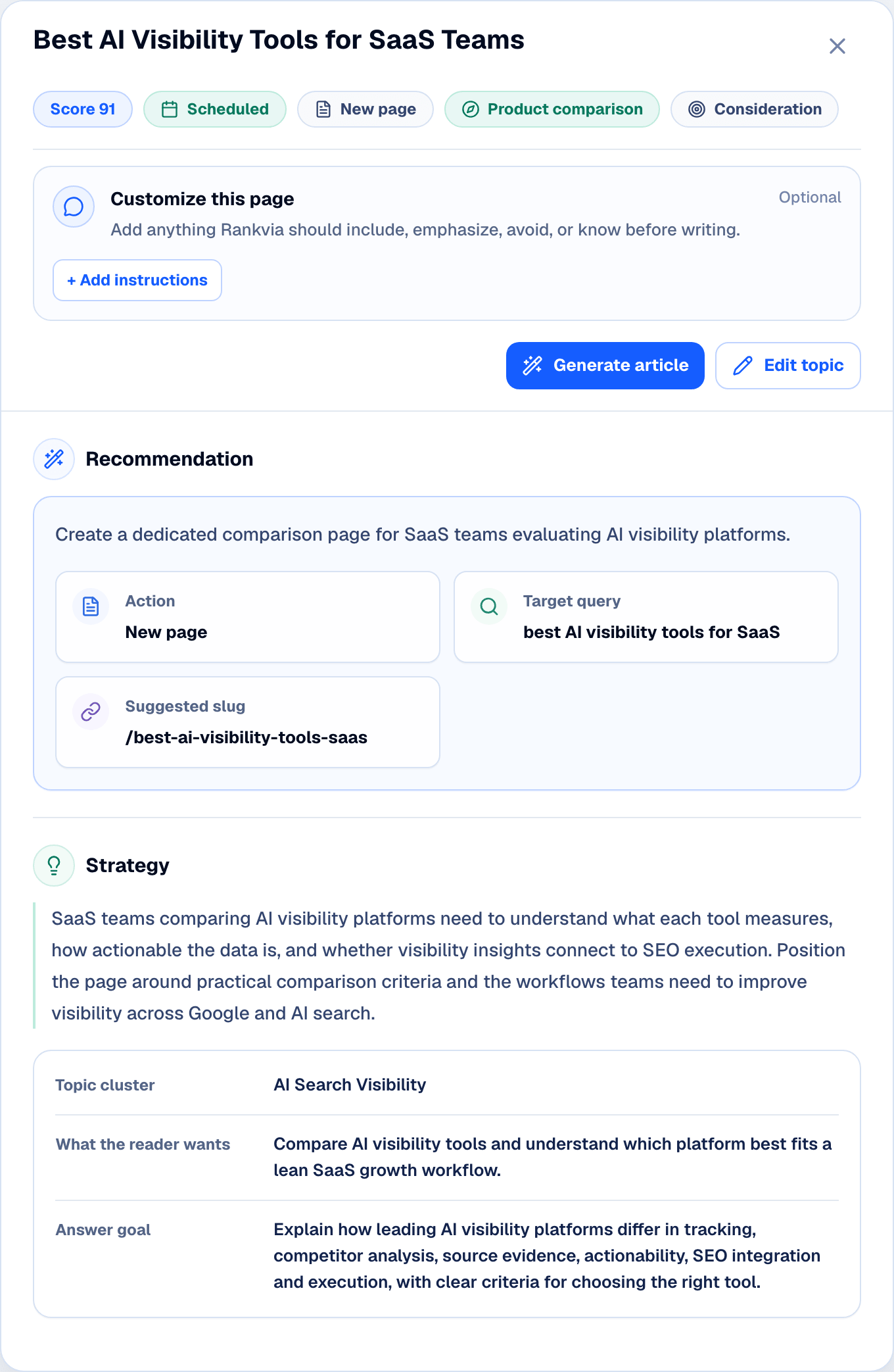
Each Page Plan turns one prioritized opportunity into a clear objective, reader intent, page type, answer strategy, business angle and next step.

  • Target query + intent
  • Page type + answer goal
  • Business context + next step
Rankvia Page Plan showing a scheduled AI visibility opportunity, recommendation, strategy, and article generation control.

Interface illustration for a separate demo business.

PLANNING IN THE WORKFLOW

From a selected opportunity to a plan for the page.

A strong content brief can define excellent strategy: the reader, objective, evidence, answer and next step. Rankvia builds its Page Plan within the workflow that analyses your business, selects the opportunity and prepares the draft.

A well-run manual process can preserve that context too. Rankvia carries the selected opportunity, business context and available evidence into its own planning and generation process.

FROM OPPORTUNITY TO PAGE PLAN

The Page Plan starts after Rankvia decides an opportunity deserves action.

Rankvia can combine search demand, AI visibility, competitors, business context and existing-page coverage when prioritizing opportunities. Once a page opportunity is selected, the Page Plan defines how that business should answer it.

Search demand + AI Visibility + Business context + Existing pages

Prioritized opportunity

Page Plan

Explore AI Visibility

PRIORITIZED BEFORE PLANNED

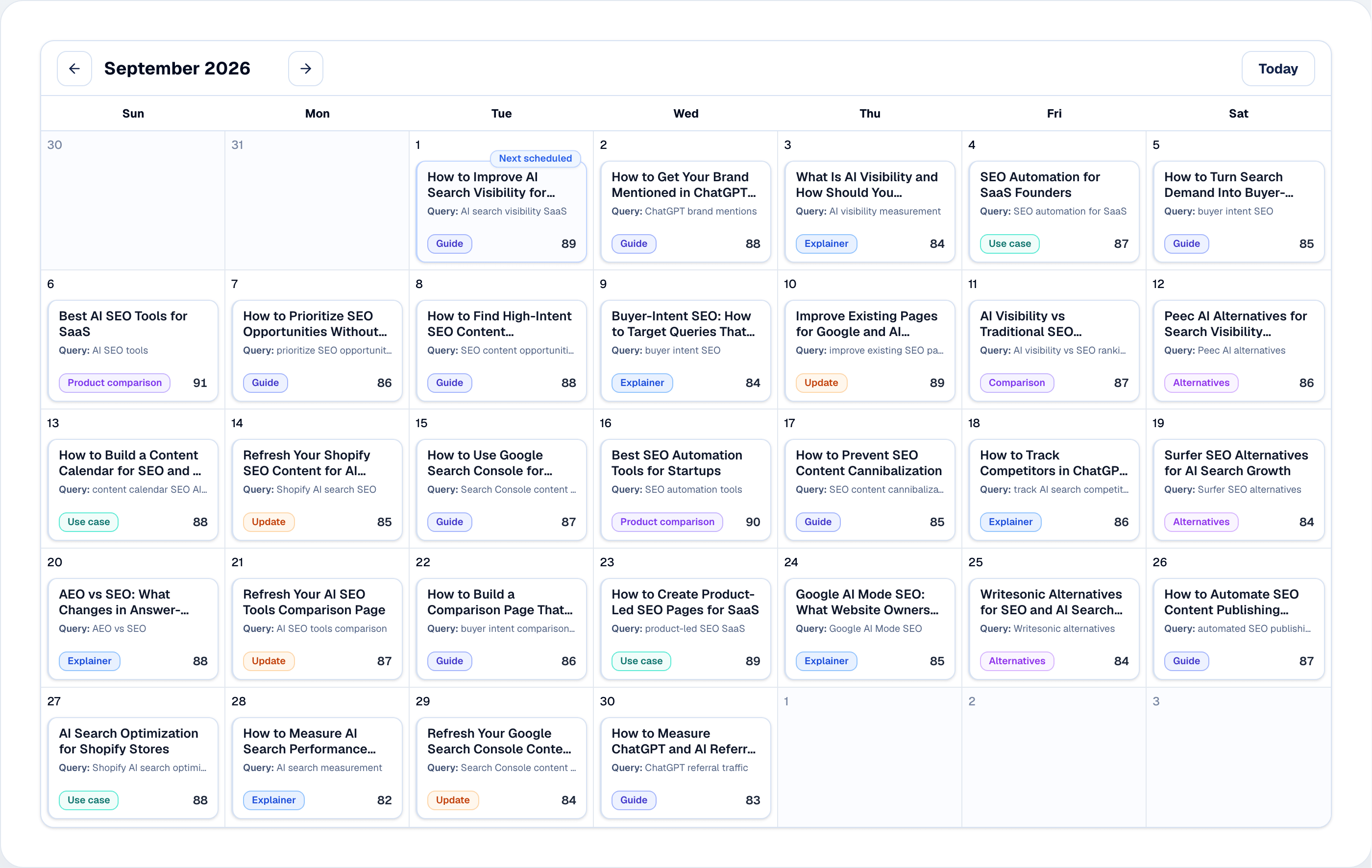
Page Plans start from opportunities already selected in the Content Calendar.

Rankvia decides what deserves attention first, then turns each page opportunity into its own strategy.

Rankvia Content Calendar showing a scheduled month of mixed search and AI search opportunities.

Interface illustration for a separate demo business.

Explore the Content Calendar behind each Page Plan.

BUILT ON SEARCH EVIDENCE

Use the evidence available for the selected opportunity.

BUYER INTENT

Target query · Search intent · Related questions

AVAILABLE EVIDENCE

Search demand · AI observations · Optional GSC

ANSWER REQUIREMENTS

Core answer · Supporting depth · Follow-up coverage

Available evidence varies by opportunity and connected inputs. This is not a live organic-ranking research panel; Google Search Console remains optional.

SPECIFIC TO THE BUSINESS

Bring the product, audience and existing website into every page strategy.

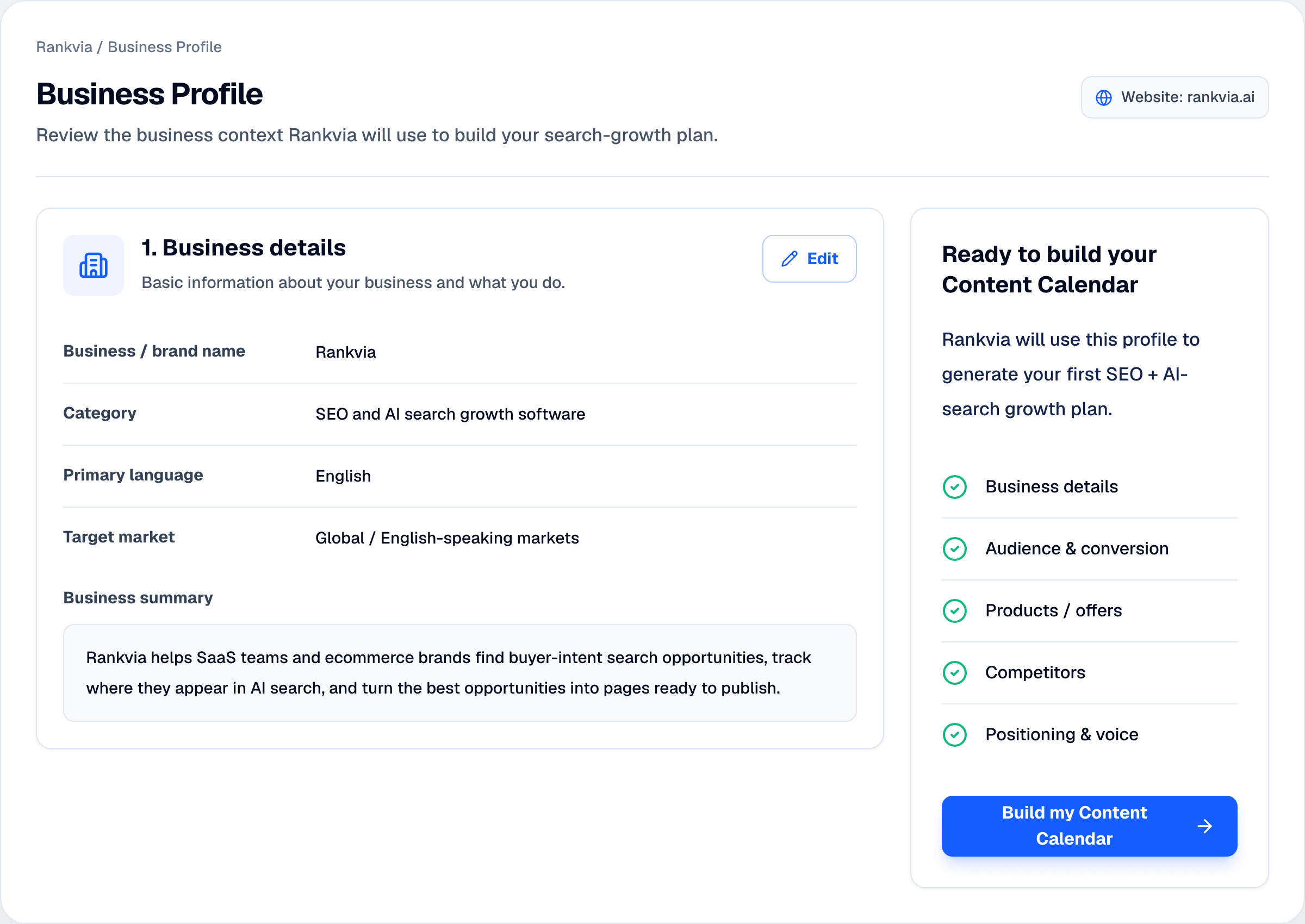
The editable Business Profile gives Rankvia the context to make each Page Plan credible for the company, its buyers and its conversion goal.

  • Product or service
  • Audience and positioning
  • Existing page context
Rankvia Business Profile showing business details, structured context fields, and Content Calendar readiness.

Interface illustration for a separate demo business.

PAGE STRATEGY

Give every page a role before creating it.

Purpose

Objective, reader, page role and angle.

Answer strategy

Direct answer, structure and supporting depth.

Business integration

Positioning, internal connections and next step.

FROM PLAN TO GENERATION

Carry the selected opportunity through to the draft.

Rankvia carries the selected opportunity’s planning context into generation. The draft is guided by a plan, relevant business facts and internal-link candidates.

  1. Selected opportunity

    Suitable work from the Content Calendar.

  2. Page Plan

    Strategy for the page.

  3. Generated page

    Complete draft from the plan.

  4. Publishing mode

    Review First or eligible, configured Autopilot.

Explore Content Creation

YOU STAY IN CONTROL

Keep business facts and publishing choices under your control.

Business Profile

Correct the business context.

Content Calendar

Review the selected topic and add factual custom instructions.

Generated Page

Review and edit the saved draft. Configure publishing separately.

Review First keeps a human review step before publication. Optional Autopilot can publish eligible scheduled work after opt-in and supported WordPress or Shopify setup; it does not require a separate approval for every article.

PRICING

Choose your search-growth capacity.

Launch

$39/month

per website

For getting your highest-priority opportunities moving.

Search growth capacity

10 pages / month

AI Visibility

Up to 25 buyer questions

Growth

Most popular
$99/month

per website

For expanding across more topics, use cases and buyer journeys.

Search growth capacity

30 pages / month

AI Visibility

Up to 50 buyer questions

Scale

$189/month

per website

For running a higher-volume search growth program.

Search growth capacity

60 pages / month

AI Visibility

Up to 100 buyer questions

Each subscription covers one website.

PAGE PLANS FAQ

Questions before you plan?

Prefer to start manually? Use the free content brief template.

Plan the page before generating the draft.

Enter your website and let Rankvia find the strongest opportunities and build the strategy behind each page.

Account required · Free preview subject to eligibility · No credit card required