
Guides Shopify blog SEO: Build articles around the search need, not the keyword
SHOPIFY BLOG SEO
Shopify blog SEO: Build articles around the search need, not the keyword
Learn how to plan, write, optimize, link, measure, and improve Shopify blog posts around real search intent - without keyword stuffing or word-count formulas.
By Rankvia ·
This guide starts with an assumption: you've already decided the topic is worth covering and that an article - rather than a product, collection, or another existing page - is the right place to cover it.
At that point, the SEO problem becomes much more specific. You need to turn that opportunity into a page that genuinely answers the search need, fits into the rest of the Shopify store, and remains useful enough to improve once real people and search engines start interacting with it.
Shopify blog SEO is the process of planning, creating, optimizing, connecting, publishing, and improving editorial Shopify pages around real customer and search needs. Titles, headings, metadata, links, and technical checks all matter, but they cannot rescue an article whose job was never clear in the first place.
A 3,000-word post with eleven H2s, eight FAQs, and fifteen internal links can easily be worse than a focused 900-word article that understands exactly what the reader came to learn. Google explicitly says it has no preferred word count and cautions against writing to arbitrary lengths because someone claims search engines prefer them.
If you're still deciding whether a search should belong to a product, collection, article, or existing-page improvement, start with Shopify Content Strategy.
For the broader store-wide search system, see Shopify SEO.
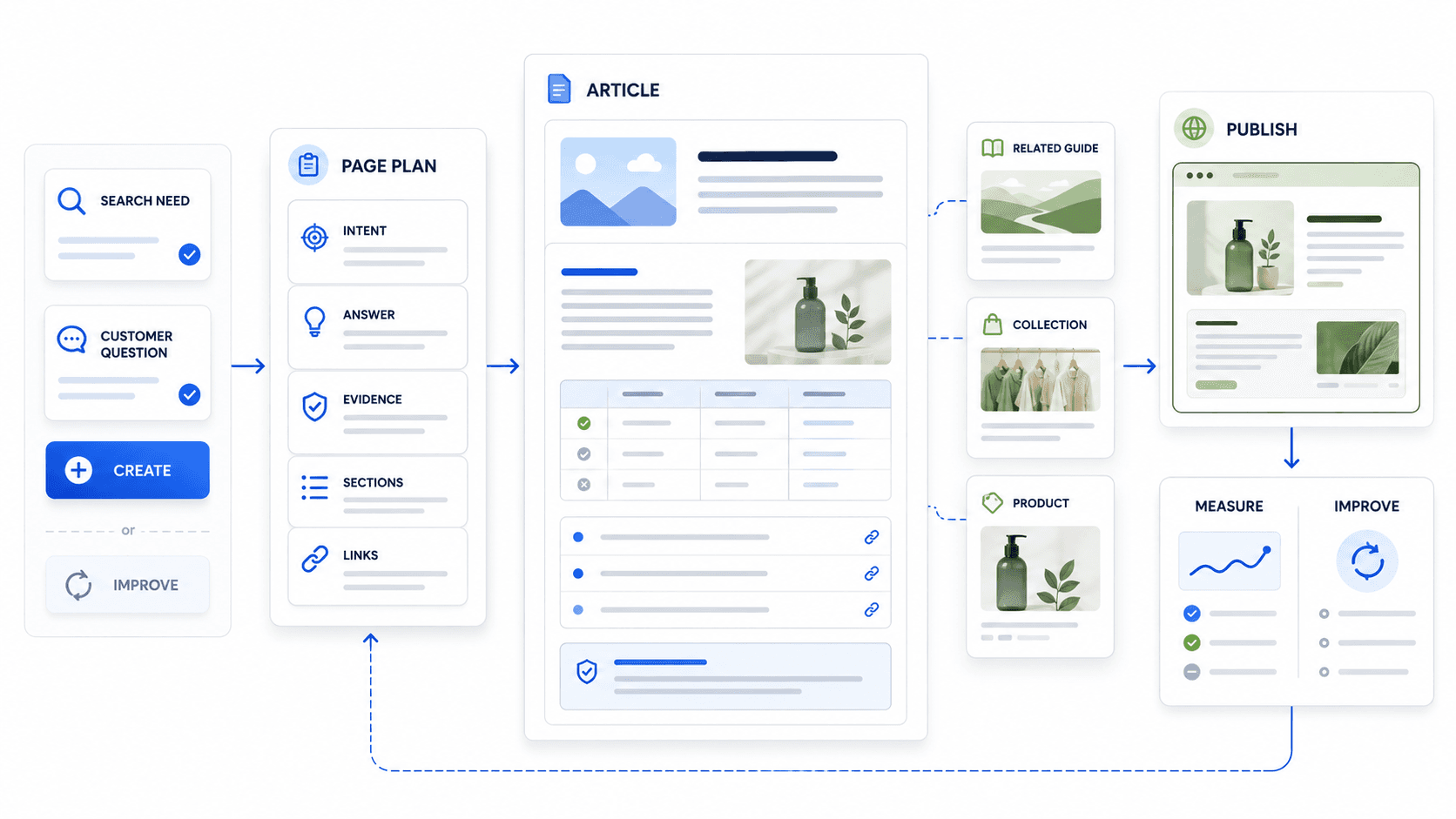
The Shopify Blog SEO lifecycle
- APPROVED ARTICLE OPPORTUNITY
- INTENT - What does the reader need?
- PAGE PLAN - What must the article accomplish?
- ANSWER + STRUCTURE - How should that need be served?
- DEPTH + PROOF - What makes the answer useful and credible?
- STORE CONNECTIONS - Where can the reader go next?
- SEO / SHOPIFY CHECK - Can search systems access and understand it?
- REVIEW + PUBLISH - Is it accurate and ready?
- SEARCH + STORE EVIDENCE - What actually happened?
- IMPROVE - What should change? ↺
That lifecycle is a more useful way to think about Shopify blog SEO than a checklist you run five minutes before clicking Publish.
1. Shopify blog SEO starts after the topic earns a page
Keyword research still matters. So does search intent. But by the time you're optimizing an article, the broader question of whether that need belongs in editorial content should already be mostly settled.
Consider:
best travel backpack for European carry-on
A retailer with a broad assortment might justify a substantial buying guide. Another store may already have a strong carry-on collection that deserves to own most of that demand, with editorial content supporting the decision. A single-product brand could reasonably structure the same opportunity around its product page plus narrower supporting education.
Those are content-strategy decisions. Once the answer is that an article should exist, blog SEO takes over.
From there, the job is not to make the target phrase appear in enough places. It is to make the article a strong enough answer that it deserves to remain the site's editorial owner for that need.
Shopify's own blogging tools and guidance cover many of the mechanics - article creation, links, tags, search-engine listing fields, publication, and later editing. For an ecommerce store, those pieces become more useful when they are tied to the article's actual role inside the wider site.
2. Define the article's job before you draft it
It's easy to generate polished copy from a weak brief now. That makes the quality of the brief more consequential, not less.
Before writing, you should know what the reader is trying to understand or decide, whether you're creating something new or improving an existing article, what type of page you're building, what the answer roughly is, and what information the business can add that another generic article cannot.
Before You Write
1. What is the reader trying to understand or decide?
Start with the need rather than the phrase.
best hiking backpack
is a query.
The job behind it might be:
Help someone choose a backpack based on trip length, load, fit, weather, and travel constraints.
That distinction affects almost everything that follows.
2. Is this Create or Improve?
If an existing article already owns most of the need, start there rather than assuming another URL will help.
A new query variation does not automatically justify another post. Google's current generative Search guidance explicitly warns against producing separate pages for large numbers of query variations and notes that its systems can understand related meanings without exact wording.
3. What kind of article is it?
An educational guide, comparison, buying guide, use-case page, and support article may all live under the same Shopify blog.
They should not read as though they came from the same template.
4. What is the direct answer?
You do not need to know every sentence before drafting, but you should know where the article is going.
If the central answer is still vague, more research may be necessary before the outline becomes useful.
5. Which supporting questions are actually necessary?
Related keywords can be useful research inputs. They are not automatically section headings.
Include the subquestions required to make the central answer complete.
6. What can this business add that isn't generic?
This is often where a retailer or brand has an advantage over a generic publisher.
Useful inputs might include real measurements, tests, materials or formulation knowledge, compatibility information, recurring support questions, original comparisons, first-hand product use, or proprietary data.
Google's people-first guidance explicitly asks whether content provides original information, research, analysis, and first-hand expertise instead of mainly summarizing what others already say.
7. How should the page connect to the rest of the store?
The logical continuation might be another guide, a comparison, a collection, or a product. Sometimes no commercial step is appropriate yet.
8. What will you look at after publication?
Think about this before launch. Otherwise the plan ends exactly when the useful evidence begins.
The article may later need improvement because of unexpected queries, incomplete coverage, stale product information, weak clicks, or a change elsewhere on the site.
Rankvia's current Page Plans carry the page objective, answer strategy, supporting depth, business context, internal connections, and next step into generation rather than starting the draft from a blank prompt.
See how Rankvia plans pages.
3. Match the article structure to the reader's intent
A lot of generic blog SEO advice quietly assumes every article should have roughly the same shape: introduction, definitions, benefits, tips, FAQ, conclusion.
That becomes awkward as soon as the reader's job changes.
Someone trying to understand a concept needs a different page from someone comparing two products. A customer troubleshooting a product does not want to work through several hundred words of category background before reaching the instructions.
Article Intent → Structure Matrix
| Article type | Reader job | Useful structure | Commercial role | Common failure |
|---|---|---|---|---|
| Educational guide | Understand | Direct answer → explanation → evidence/examples → related questions | Mostly indirect | Long generic intro or premature sales pitch |
| Comparison | Choose between options | Core differences → comparison dimensions → tradeoffs → who each fits | Strong decision support | Explaining each option separately without actually comparing |
| Buying guide | Select the right option | Buying criteria → options/types → recommendations/context → next step | Strong | Arbitrary listicle with no decision logic |
| Use-case article | Solve a specific situation | Situation/constraints → what matters → options/approach → relevant next step | Medium-strong | Broad generic article with the use case only in the title |
| Product-support / how-to | Use or troubleshoot | Direct instruction → steps → caveats → related support/product context | Existing customer/support | SEO introduction that delays the actual instructions |
An educational article about creatine should orient someone quickly, then explain how it works, where the evidence is strong or limited, and what details matter for the reader's question. It does not need a paragraph about humanity's long history of trying to improve physical performance.
A comparison has a different burden. Someone searching merino wool vs polyester for hiking wants to understand differences in things such as moisture, drying time, odor, durability, weight, comfort, and price. The article becomes frustrating if it spends half its length defining each material separately and only compares them near the end.
Buying guides need actual selection logic. Best travel backpacks is far more useful when the reader understands why one model works for under-seat travel while another suits camera gear or long-term one-bag travel. Twelve products followed by twelve near-identical sales blurbs is not much of a guide.
Use-case pages also need the use case to change the answer. Best backpack for travel and best backpack for Ryanair personal-item travel can be meaningfully different because the second introduces real size constraints. If the scenario changes nothing beyond the title, the page probably isn't as specific as it claims.
And with support content, the rule is refreshingly simple: if someone came for instructions, give them the instructions.
4. Write a title and opening that make the article's job obvious
A good title reduces ambiguity. It tells both the reader and the search system what problem the page is there to solve.
Google recommends descriptive, concise page titles and warns against keyword stuffing and repetitive boilerplate. It also makes clear that there is no fixed <title> length limit; titles are truncated in results when necessary for the device and context.
That makes title writing an editorial problem more than a character-count problem.
Travel Backpacks
is vague.
How to Choose a Carry-On Backpack That Fits Under the Seat
gives the reader a much clearer idea of what the page will help with.
Your SEO title and H1 can be identical or close to it. There is no need to manufacture variation for its own sake.
For example:
SEO title
Carry-On Backpack Sizes: How to Choose the Right Capacity
H1
What backpack size do you actually need for carry-on travel?
Those two versions serve the same intent with slightly different presentation. That can be useful. It is not mandatory.
Google can draw on several page signals when generating title links, including the <title>, visible page title, headings, prominent text, and link text. Keeping those signals coherent is more sensible than deliberately making them different.
Treat the meta description as a useful description, not a ranking formula
Google generates snippets primarily from page content, though it may use the meta description when that gives users a better description for the query. It also states that there is no fixed meta-description length limit; snippets are truncated as needed.
Write something that accurately summarizes what the reader will get.
For example:
Learn how to choose carry-on backpack capacity based on airline dimensions, trip length, laptop space, load, and how you actually travel.
That is more useful than stuffing several variations of travel backpack into the field.
Shopify exposes the page title, meta description, and URL handle directly in the blog post's search-engine listing controls and can create a redirect when an article URL changes.
Get to the useful part of the answer
Someone who came with a clear question should not have to work through a generic introduction before finding out whether the article is relevant.
Instead of:
Choosing the perfect travel backpack can be a daunting task in today's fast-paced world...
you can begin with something useful:
For carry-on travel, external dimensions usually matter more than the backpack's advertised liter capacity. Start with the airline's size allowance, then compare the bag's actual dimensions, packed depth, and the space you need for a laptop or camera gear.
You can add context afterward.
There is no reason to turn that into another fixed SEO rule about answering within 40 or 50 words. The underlying editorial principle is enough.
5. Write to the depth the decision needs - not a word count
There is no ideal Shopify blog-post length for SEO.
Google says this directly: it has no preferred word count, and writing to a particular length because you've heard search engines want it appears among its warnings for search-first content.
A focused support article explaining how to reset a portable espresso machine may need only a few hundred clear words and a good step sequence.
A serious comparison of backpack suspension systems might legitimately need several thousand words because the reader needs to understand fit, load distribution, materials, measurements, and tradeoffs.
The difference is not that one page is "SEO content" and the other is not. One problem simply requires more information.
Depth is useful when it comes from necessary criteria, evidence, examples, comparisons, caveats, or technical details. It stops being useful when another section merely restates an idea already established earlier in the article.
That also applies to AI search. Google's July 2026 generative Search guidance says there is no ideal page length and no need to reshape pages into tiny machine-oriented fragments.
A 900-word page that leaves the reader satisfied is more complete than a 2,800-word page that sends them back to search.
6. Add information a generic article cannot
Ecommerce businesses often have useful information that generic content publishers do not.
The problem is that it rarely starts life as a polished paragraph.
It may live in product documentation, support conversations, test notes, merchandising decisions, measurement sheets, formulation data, return reasons, or simply in the experience of people who work with the products every day.
A travel brand might know the bag's actual packed dimensions, whether a 16-inch laptop fits comfortably, how the straps behave under heavier loads, or which airline constraints customers repeatedly misunderstand.
A skincare company may have formulation details, stability testing, compatibility guidance, product-development rationale, and recurring support questions.
A furniture retailer may know which table dimensions cause confusion, how many adults realistically fit around a particular shape, and which finishes behave differently under daily use.
This is the kind of material that can make an article difficult to replace with another generic summary.
Google's people-first guidance emphasizes original information, analysis, first-hand expertise, and substantial additional value beyond what other pages already provide. Its newer generative Search guidance similarly emphasizes unique, expert-led, non-commodity content.
Match evidence to the claim
Not every statement needs a footnote. Some claims do.
Health, safety, scientific, regulatory, technical, and platform-behavior claims deserve stronger evidence than a casual editorial observation.
A supplement store should not rely on another supplement company's blog as the main authority for a medical claim when primary scientific or regulatory sources are available. Likewise, an article explaining Google's AI-search behavior should cite Google rather than an SEO post paraphrasing Google.
Citations are useful because the underlying claim needs support.
They are not decorations you add in the hope that AI systems will return the favor.
Good comparisons usually include tradeoffs
If two products, materials, or approaches are genuinely different, the useful answer is often conditional.
One option may be better when weight matters, another when durability matters. One serum might be more appropriate for a particular skin concern while another is better tolerated by a different user.
Real comparisons are rarely improved by forcing a universal winner where there isn't one.
7. Connect the article to the rest of the Shopify store
A strong ecommerce article should feel like part of the store rather than an SEO publication accidentally hosted on the same domain.
The connections do not have to follow a fixed funnel.
Possible internal relationships
- RELATED ARTICLE ↕ CURRENT ARTICLE
- BUYING GUIDE / COLLECTION
- PRODUCT
Possible relationships - not a mandatory funnel.
An educational article about how creatine works may lead naturally to another guide on creatine types or usage before a product becomes relevant.
A comparison such as creatine monohydrate vs HCl sits closer to a product decision, so a related collection or specific products may make sense.
A support article explaining how to wash a merino shirt might point to care instructions, the garment's own product guidance, or a relevant care product.
The common thread is not commercial intensity.
Google recommends crawlable links and descriptive, relevant anchor text so users and Google can understand linked destinations. Shopify's current blog editor supports links and rich-text content directly within posts.
There is no useful universal link count. A short support article may need only a few links. A substantial buying guide may naturally contain many more.
Relevance is the better constraint.
For the broader internal-linking system:
8. Let the article support commerce without turning it into a sales page
Ecommerce teams often struggle with informational traffic because the two most obvious interpretations are both too simple.
One says traffic is always valuable because more people are discovering the brand. The other says informational traffic is a waste unless it leads quickly to revenue.
The real answer depends on the job of the page.
An article can introduce a relevant customer to the store, explain a category, help compare options, move someone toward a collection, establish expertise, or earn links and references. Some of those outcomes happen much earlier than a transaction.
A reader asking:
what is merino wool
may still be learning the category. A product grid in the first paragraph could be premature.
Someone searching:
best merino wool shirts for hiking
is much closer to evaluating products.
Both people may arrive on editorial pages, but treating them as if they are at the same point in the decision would defeat the purpose of understanding intent.
A blog becomes strategically weak when much of its traffic comes from topics the store has no credible way to serve and when those pages remain disconnected from both the brand's expertise and the rest of the site.
Adding more product links does not solve that.
Choosing better editorial territory does.
9. Get the Shopify-specific SEO details right
Once the article itself is strong, the Shopify mechanics are relatively straightforward. They matter, but they should not dominate the editorial process.
Page title, meta description, and URL handle
Shopify lets you edit all three for each blog post. If you change the URL, Shopify can also create a redirect from the old address.
Keep handles descriptive and reasonably stable. An established URL is usually not worth changing simply because you discovered a slightly different keyword phrasing.
Don't turn title length into a ranking rule
Shopify's interface may warn when titles or descriptions could be cut off in previews. Google, however, states that <title> elements do not have a fixed length limit and that title links are truncated according to the context and device.
Treat length as a presentation consideration.
Not a pass/fail ranking threshold.
Use blogs and tags for useful organization
Shopify supports multiple blogs and tags, and describes tags as a way to organize posts by category or subject.
Use those structures when they make the store easier to navigate or maintain. Do not assume adding more tags creates a ranking benefit.
Whether tag-related archive pages are useful, redundant, or need different indexation treatment depends on the actual theme and site structure. Blanket rules are rarely useful here.
Use a real author when authorship matters
Shopify's current post author field uses store staff members with the appropriate access.
For topics where expertise matters, readers should be able to understand who created or reviewed the content and why that source is credible.
There is no benefit in inventing expert identities to make a page look more authoritative.
Use images when they add information
A useful image might show a sizing example, product comparison, assembly step, material detail, or test result.
Alt text should accurately describe relevant image content. It is not another field for stuffing keyword variants.
Check what the theme already outputs before adding schema
Google supports Article, NewsArticle, and BlogPosting structured data for editorial pages, which can help it understand information such as headline, images, authors, and dates.
Many Shopify themes or apps already output some markup.
Inspect the page before layering another schema implementation on top of it. Duplicate or conflicting structured data is not an upgrade.
Make sure the article can actually be found
The fundamentals remain boring and necessary: the page should be published, crawlable, mobile-usable, and connected to the site through normal links.
Shopify blog posts are hidden until published/visible, and Shopify documents visibility as necessary for them to appear in store search.
For the broader technical system:
10. Review before you publish
The final review is more useful when you ignore the SEO score for a moment and read the article as the person it is supposed to help.
Does it still answer the job defined in the brief? Are product details current? Do the examples hold up? Are important factual claims appropriately sourced? Did the draft inherit any generic sections that no longer contribute much?
The commercial path deserves the same check. A CTA that looked sensible in the outline may feel forced once you read the finished page. An internal product link may be unnecessary; another guide might be the better continuation.
Then check the mechanics.
Before publishing Does the article answer the intended customer/search need? Is the article type still appropriate? Are product and factual claims current? Does the page add something beyond a generic summary? Do the headings help someone navigate the answer? Are internal links genuinely useful? Does any commercial next step fit the reader? Are the title, meta description, and URL correct? Does the page work properly on mobile? Have you checked for a substantially overlapping existing article?
A short review here is cheaper than discovering the wrong page structure after the URL has months of search history.
11. Use Search Console to decide what the article should improve
Once the article is live, you finally get evidence about how Google is interpreting it.
Search Console's Performance report can group data by dimensions such as query and page and exposes metrics including impressions and clicks; CTR is also part of the Search performance model. It will not tell you the entire business value of the article, but it can reveal whether the page is being associated with the need you expected.
Article feedback loop
- PUBLISHED ARTICLE
- SEARCH CONSOLE - Queries + impressions + clicks
- What changed?
- New queries? Weak CTR? Missing coverage? Unexpected intent? Overlap?
- DIAGNOSE
- IMPROVE / LEAVE / RECONSIDER
A carry-on backpack guide might begin appearing for:
personal item backpack dimensions; backpack for Ryanair under-seat travel; 30L backpack carry on; laptop backpack personal item.
Those queries are clues, not instructions.
Some may reveal questions the existing article should answer more clearly. Others may describe a genuinely separate use case. A few may simply be incidental visibility that does not justify changing anything.
The same judgment applies to high impressions with weak clicks. The title may be vague, the snippet may poorly represent the page, or the article may be showing for a search it was never designed to satisfy.
Google explains that snippets are generated dynamically and may use page content or the meta description depending on what seems most useful for that query. Editing the meta description therefore does not guarantee that Google will show the new text.
Unexpected queries can be useful too. They might expose a gap in the article, a confused page owner, or a broader need than the original brief anticipated.
And when performance declines, diagnose before refreshing. Search demand can change. Seasonality can matter. Competitors can improve. Product information can become stale. The SERP itself can change.
A drop is evidence that something deserves investigation, not proof that the article needs a rewrite.
Rankvia's current Google Search Console integration uses existing queries, search-visible pages, impressions, and other supported performance evidence as additional context for page ownership, Create/Improve, prioritization, and Content Calendar planning.
Explore Rankvia's Google Search Console integration.
12. Update an article when the evidence gives you a reason
“Refresh your content regularly” is reasonable advice until it becomes a ritual.
Editors change a few sentences, update the date, and call the page fresh even though nothing meaningful improved.
Google explicitly warns against changing dates simply to make content appear fresh and says adding or removing content only to create an appearance of freshness does not improve rankings on its own.
An article deserves improvement when something important changed or the available evidence exposes a real weakness.
Useful triggers include an important query the page almost serves but doesn't quite answer, changed product specifications, discontinued items, outdated factual information, broken internal links, overlap between two articles, or a commercial next step that no longer fits.
A meaningful shift in search intent can also justify a larger reconsideration.
Age by itself is weak evidence.
A four-year-old evergreen sizing guide can remain excellent.
A three-month-old article referencing a discontinued product can already be stale.
Sometimes the correct outcome is Improve. Sometimes it is Leave. Sometimes two articles should be consolidated. Occasionally the original page should no longer own the need at all.
The feedback loop exists so those decisions can come from evidence rather than from a recurring calendar reminder.
13. What AI search changes at article level
You do not need to rewrite Shopify articles into machine-oriented prose for AI search.
Google's July 2026 guidance for AI Overviews and AI Mode says its normal search foundations still apply, its systems can understand query variation, and site owners do not need special AI-only pages, special markup, or artificial content chunking simply to participate in generative Search.
At article level, the useful implications are mostly good editorial practice.
Make answers clear enough to understand. Use headings that describe meaningful sections. Prefer concrete information over vague marketing language. Use comparisons when someone is genuinely weighing alternatives. Cite strong sources when factual claims need evidence, and publish first-hand or original information when the business actually has it.
A specification such as:
45 × 30 × 18 cm
is easier to evaluate than:
compact and travel-friendly.
A comparison table is useful when the reader is making a multidimensional comparison. It does not belong in every article merely because somebody claims AI systems like tables.
And one strong page remains better than a collection of near-duplicates built around conversational paraphrases of the same need. Google explicitly warns against creating pages for every possible query variation primarily to influence conventional or generative search.
For Shopify Catalog, Agentic Storefronts, ChatGPT shopping, llms.txt, and the rest of Shopify's AI-discovery infrastructure:
Shopify AI Search Optimization
14. AI can speed up the draft - it cannot decide what is true
Shopify currently offers Shopify Magic for generating blog titles and blog content, while Google explicitly says generative AI can be useful for researching topics and adding structure to original content.
The use of AI is not particularly interesting by itself.
The editorial question is what happens around it.
AI can organize research, explore an outline, draft a section, surface related questions, or rewrite clumsy prose. It cannot independently know whether a product claim is true, whether your company's experience contradicts a generic source, whether an example reflects the real customer, or whether the page adds anything worth publishing.
Those decisions still need the business.
Google's current policy takes a similar view: automatically generating many pages without sufficient user value may violate its scaled-content-abuse policy.
A faster draft does not make a weak brief better.
Use AI to make execution less expensive.
Do not let cheaper execution lower the publication standard.
15. Measure the article against the job it was supposed to do
A beginner's educational guide and a high-intent product comparison should not be judged by exactly the same metric.
The first may attract a large audience that is still learning the category. The second may bring fewer visitors who are much closer to making a purchase. A support article can be valuable even if its primary audience already owns the product.
Article Performance Matrix
| Article job | Search evidence | Store/business evidence | Improve question |
|---|---|---|---|
| Discovery | Impressions, clicks, query growth | Qualified sessions | Are we attracting the intended audience? |
| Education | Relevant query coverage | Useful next-page behavior | Is the answer complete and useful? |
| Comparison | Commercial-investigation queries | Relevant collection/product visits | Does it actually help someone choose? |
| Buying guide | Search visibility and query fit | Commercial progression where measurable | Are the criteria and options genuinely useful? |
| Product support | Support/search queries | Customer success or support outcomes where measurable | Is the guidance accurate and current? |
| Authority | Links, mentions, references | Broader brand/search value | Is there something worth citing? |
| Improve | Before/after page and query trends | Qualified performance change | Did the update address the real weakness? |
Search Console is the better source for understanding how the article performs in Google Search. Store analytics can help explain what happens after the visit.
Neither gives you perfect attribution for every role an article can play.
That is fine.
Measurement becomes useful when it changes what the team does next: which article gets improved, which content types deserve more investment, which topics attract the wrong audience, and which pages should probably stop consuming editorial time.
16. Turn Shopify blog SEO into a recurring workflow
Everything in this guide can be done manually.
For one article, that is often straightforward: research the need, write a brief, create the page, add useful links, check the Shopify fields, publish it, and review the data later.
The operating cost becomes more visible when a store has hundreds of existing pages and dozens of plausible new opportunities.
Now the brief needs business context and site context. Someone needs to check whether the article already exists in another form. Internal links need to reflect current products and collections. The page must move through review and Shopify publishing. Months later, Search Console evidence needs to be connected back to the original intent rather than sitting in another dashboard.
Teams often solve each part with a different tool.
The SEO platform finds the query. A spreadsheet stores the calendar. A document contains the brief. An AI tool creates a draft. Someone searches the site for internal links. Another person moves the finished piece into Shopify. Search Console comes back into the picture later.
None of those steps is especially complicated.
Keeping their decisions consistent is.
17. How Rankvia fits
Rankvia is designed around that coordination layer rather than around generating an isolated article from one keyword.
The process begins with the existing store and its business context. Its Content Calendar organizes search opportunities while taking existing website coverage into account, including whether an opportunity should become Create, Improve, or no additional page where the need is already adequately covered.
Once an opportunity is selected, a Page Plan defines what the page is supposed to accomplish before generation: its objective, reader or buyer decision, answer strategy, supporting depth, business context, and relevant internal connections. Rankvia then carries that plan into generation instead of restarting from a blank prompt.
Search Console can add first-party query, page, impression, and supported performance evidence to those planning decisions. For Shopify stores, Rankvia currently supports sending articles and pages to Shopify with publishing details including blog selection, URL handle, SEO title/meta description, and draft or live publication state. Merchants can keep review-first publishing or explicitly configure Shopify as the automatic destination for eligible scheduled content.
A simplified version of the workflow looks like this:
- APPROVED OPPORTUNITY
- CONTENT CALENDAR
- PAGE PLAN
- GENERATE + INTERNAL LINKS
- REVIEW
- PUBLISH TO SHOPIFY
- SEARCH EVIDENCE
- FUTURE IMPROVE DECISIONS
Rankvia does not replace factual product verification, technical theme development, broader technical SEO, CRO, link acquisition, or human business judgment.
Its role is narrower: keep the content and search decisions connected from opportunity through publication so that a good brief does not become disconnected from the store somewhere along the way.
See Rankvia for Shopify.
18. Shopify blog SEO checklist
Use this before treating an article as finished.
Before writing
- The article has one clear customer/search job.
- Editorial content has already been chosen as the appropriate owner.
- Create vs Improve has been considered.
- The article type is clear.
- The direct answer is understood before drafting.
- Necessary supporting questions are known.
- Useful business-specific information has been identified.
Writing and structure
- The introduction gets to the useful answer without unnecessary setup.
- Headings correspond to real reader questions or decisions.
- Article depth comes from useful information rather than a word-count target.
- Examples are specific and credible.
- Comparisons actually compare.
- Factual claims have appropriate evidence.
- Generic filler has been removed.
Store connections
- Internal links help the reader continue where appropriate.
- Product or collection links appear only when they make sense.
- Anchor text describes destinations naturally.
- The article is connected to the rest of the store.
Shopify SEO
- The page title accurately describes the article.
- The H1 is clear and consistent with the page's job.
- The meta description is useful.
- The URL handle is appropriate.
- The page is published and crawlable as intended.
- Relevant images have accurate alt text.
- Existing theme/schema output has been checked before adding more markup.
Review and publishing
- Product information is current.
- Important claims have been reviewed.
- Links work.
- The page reads well on mobile.
- Any commercial next step fits the reader.
- No substantially overlapping article has been overlooked.
Measurement and Improve
- Search Console performance is reviewed after publication.
- Query expansion is interpreted rather than blindly copied into the article.
- High impressions and weak clicks are diagnosed before editing.
- Declines trigger investigation rather than automatic refreshing.
- Existing articles are improved when the evidence supports it.
- Publishing volume is not treated as the primary KPI.
AI-assisted production
- AI may assist with research, structure, drafting, or editing.
- Product facts and important claims are verified.
- Business-specific knowledge has not been replaced by generic generated prose.
- The article is not one of many near-duplicate pages created for query variations. For the broader process from research and page planning through Shopify publication, see the Shopify SEO content automation guide.
Shopify blog SEO FAQ
What is Shopify blog SEO?
Shopify blog SEO is the process of planning, creating, optimizing, connecting, publishing, and improving editorial pages on a Shopify store so they satisfy real customer and search needs and support the wider website.
It includes search intent, article structure, original information, internal links, metadata, technical checks, measurement, and later improvement - not just keyword placement.
Do Shopify blogs help SEO?
They can.
Useful Shopify articles can earn search visibility, answer customer questions, support related products and collections, strengthen a site's coverage of relevant topics, and earn links or references.
Simply having a blog does not improve rankings. The individual pages still need a worthwhile job.
How do I optimize a Shopify blog post for SEO?
Start by defining the article's customer or search job. Structure the page around that need, answer it clearly, add the depth and evidence the reader requires, connect the article to relevant parts of the store, check Shopify's title, meta, URL, and technical basics, then use real performance evidence after publication to guide improvements.
How long should a Shopify blog post be?
There is no ideal Shopify blog-post length for SEO.
Google explicitly says it has no preferred word count. The article should be long enough to satisfy the reader's need without padding or repetition.
A focused how-to can be short. A complex comparison or buying guide may need much more depth.
How often should a Shopify store publish blog posts?
There is no universal SEO publishing frequency.
Publish at a cadence supported by worthwhile opportunities and the team's ability to maintain quality. Shopify lets merchants publish immediately or schedule posts, but does not define a universal SEO cadence requirement.
Should Shopify blog posts link to products?
Only when the product is a useful next step.
An educational article may be better connected to another guide first. A comparison or buying guide may have a much more natural relationship with collections or products.
The internal link should follow the reader's likely next decision.
How many internal links should a Shopify blog post have?
There is no universal number.
Add links when another page provides useful context, supports the reader's next step, or clarifies relevant relationships within the site.
A short support article and a long buying guide will naturally need different numbers of links.
Should I update an old Shopify article or write a new one?
Improve the existing article when it is still the appropriate owner for the customer or search need but needs stronger, more accurate, or more complete coverage.
Create a new page when the need is genuinely distinct.
Consolidation, redirects, technical fixes, and no change are also valid outcomes. For the step-by-step diagnosis and update process, see how to refresh an existing Shopify blog post.
Can AI-generated Shopify blog posts rank?
AI assistance is not automatically disqualifying.
Google says generative AI can be useful for research and structuring original content, while large-scale generation without sufficient added value may violate its scaled-content-abuse policy.
Usefulness, accuracy, originality, relevance, and compliance with Search Essentials matter more than whether a drafting tool was involved.
Does Shopify automatically handle blog SEO?
Shopify handles useful parts of the infrastructure and gives merchants controls over article content, publication, page titles, meta descriptions, URL handles, links, images, tags, authors, templates, and other blog settings.
It does not decide the right search intent, determine useful depth, choose the best internal links, or decide how an article should improve later.
Are Shopify blog tags good for SEO?
Use tags when they improve content organization or navigation. Shopify currently describes blog tags as a way to organize posts by category or subject and let customers discover related tagged posts.
Do not treat adding more tags as a ranking strategy. Whether tag-related archive pages are useful, redundant, or need different indexation treatment depends on the actual store and theme.
APPLY THIS TO YOUR WEBSITE
See which search opportunity your Shopify store should work on next
A useful article starts before the first sentence. You need to know which opportunity deserves attention, whether the work should be Create or Improve, what the page should help the reader understand or decide, and how it fits into the existing site. Rankvia starts from the website and business context, turns relevant opportunities into a prioritized Content Calendar, builds a Page Plan for selected work, and carries that context into generation and Shopify publishing.
Personalized to your website. No credit card required.
Sources
Shopify
- Adding and managing blog posts - Current Shopify controls for blog content, authors, blogs, tags, images, templates, scheduling, SEO title/meta, URL handles, redirects, and publication.
- Automatically generating blog posts with Shopify Magic - Current Shopify-native AI drafting behavior.
- Managing searchability - Current visibility requirements for blog posts to be searchable in the storefront.
- Creating helpful, reliable, people-first content - Word-count myths, freshness myths, original information, and first-hand expertise.
- Optimizing for generative AI features on Google Search - Foundational SEO, page length, query variations, and unique content.
- Guidance on generative AI content - AI-assisted research, accuracy, quality, and scaled-content-abuse policies.
- Influencing title links - Descriptive titles and title-generation signals.
- Control your snippets - Dynamic snippets and meta-description behavior.
- SEO link best practices - Crawlable links and descriptive anchor text.
- Article structured data - Article and BlogPosting metadata.
- Search Console Performance report - Query/page dimensions and performance data.
Rankvia
- Content Calendar - Website coverage, page roles, Create/Improve, prioritization, and publishing-plan behavior.
- Page Plans - Answer strategy, supporting depth, business context, internal connections, generation, and review behavior.
- Google Search Console integration - First-party evidence used in page ownership and prioritization.
- Rankvia for Shopify - Shopify publication fields, draft/live states, review-first, and opt-in automatic publishing behavior.