Guides How to Use an AI SEO Agent to Automate Your SEO Content
AI SEO CONTENT AUTOMATION
How to Use an AI SEO Agent to Automate Your SEO Content
Learn how to use an AI SEO agent to discover opportunities, plan content, create SEO-ready pages and publish with Rankvia's connected workflow.
By Rankvia ·
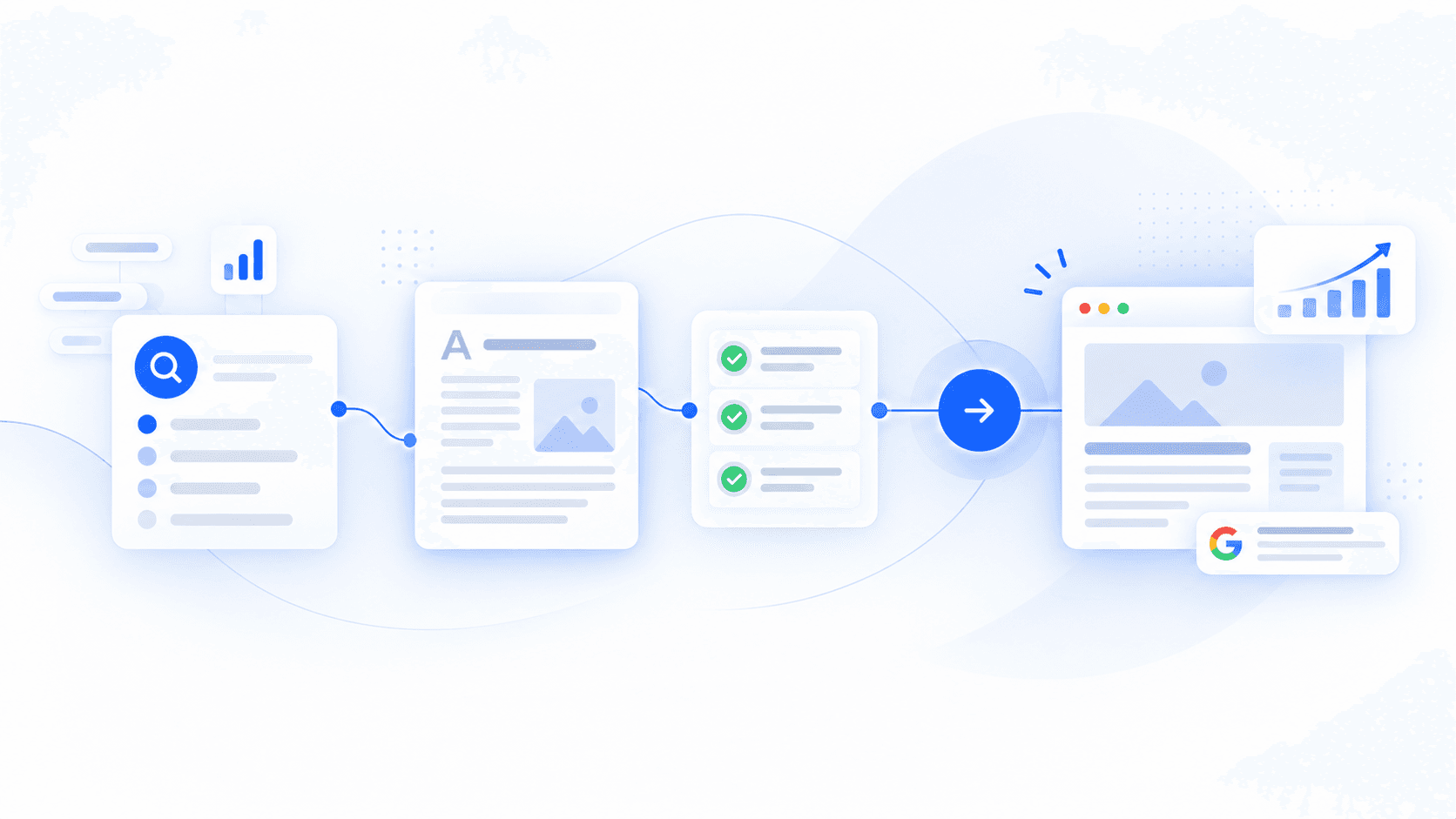
Finding topics, checking existing pages, writing briefs and preparing content for publication can fill the week before a useful page reaches your buyers.
To use an AI SEO agent, submit your website, approve its business context, review the opportunities and Content Calendar, open a Page Plan, then generate and review the page before supported publication. Rankvia takes on more of that recurring work, so you spend less time moving information between tools.
Here is the practical sequence to follow in Rankvia. For the category definition, see what an AI SEO agent is; this tutorial starts with your website and ends with a reviewed page and a clear follow-up.
What you need before getting started
Have your public website, accurate product or service information, target customers, publishing language and market ready. You will need permission to connect the destination if you want direct publication.
Start through Rankvia's free preview with an account and verified email. The preview is for eligible websites, not an ongoing free subscription. Website analysis and Business Profile approval precede planning; generation is a separate action. No credit card is required for the eligible preview. Later production and publishing depend on your current entitlement and setup.
Google Search Console is optional. It can add your own search-performance evidence; you can continue without making that connection. Your interface language is separate from the content language and market approved in your Business Profile.
The walkthrough uses Relaywise, a fictional workflow-software business. Screenshots show actual Rankvia application components with English demo data and simulated states, not customer results or proof of live generation or publication. Their controls are inactive in the captures. The steps below explain what to review in your own account.
Step 1 - Let your AI SEO agent understand your business
- Enter the public website you want Rankvia to analyze and complete the account and email-verification steps.
- Open the resulting Business Profile. Check what the business sells, who it serves, its positioning and the existing website context. Correct incomplete or inaccurate information.
- Confirm the content language and target market, then approve the profile before planning. A translated interface does not choose your publishing market for you.
For Relaywise, the useful starting point is more specific than “we sell software”: its buyers need to compare setup effort, approvals and integrations before choosing a workflow tool. Your own profile should be equally clear about the offers and buyers you actually serve.
Do not let a wrong product claim become the starting point for every page. If your business or public site changes materially, revisit the profile before relying on future planning.
Your output: an approved business foundation that gives opportunity selection and content creation a relevant direction.
Step 2 - Discover opportunities to reach more buyers
Review the opportunities Rankvia prepares for your website. Read the recommended action and its rationale before treating it as a writing assignment.
Check three things:
- Buyer need: What does the person want to learn, compare or decide? Is that relevant to an offer you actually provide?
- Page ownership: Does an existing URL already answer the need? Should Rankvia propose Improve instead of Create?
- Evidence: Consider available search demand, search intent and existing-site coverage. Search-result and competitor context can inform the planning where available; do not assume every opportunity contains a full ranking-results report. Connected GSC data is an additional source, not the same thing as estimated demand.
Open AI Visibility separately when you want to inspect supported sampled buyer questions, brand appearances and sources where available. Missing data is different from an observed absence. A missing mention is also not an instruction to create a page: Monitor, third-party visibility, Skip or no additional page may be more useful.
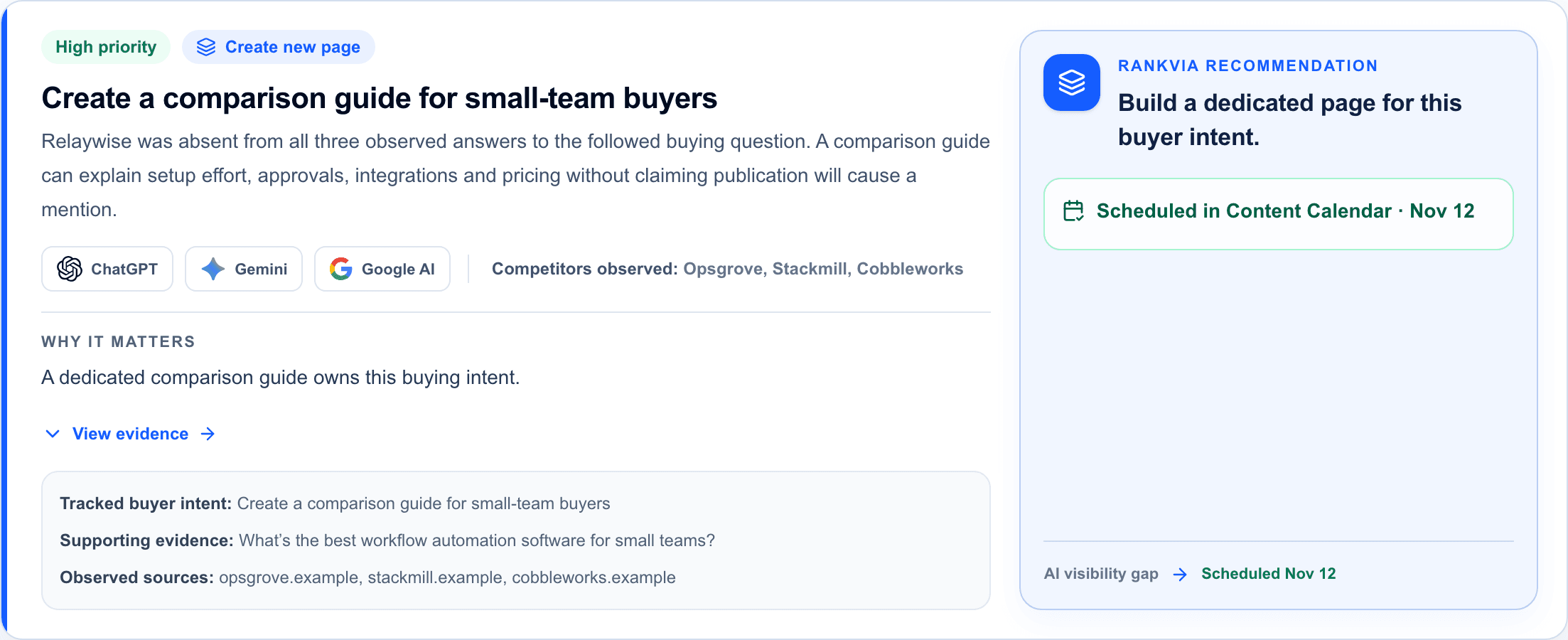
In the Relaywise demo, Rankvia recommends a comparison guide for a specific buying question. The rationale names the reader's decision, and the action is already linked to planned work. This is an example of connecting evidence to a task; it does not show that publishing will cause an AI mention.
Your output: a worthwhile page task with a reason to pursue it, rather than a keyword copied into another spreadsheet.
Step 3 - Turn opportunities into a Content Calendar
Open Content Calendar for the same website. Review the proposed topics, page types, actions and dates. The benefit is a dated growth roadmap: you can see what deserves attention next without rebuilding the weekly plan yourself.
Choose one useful item to follow through. Check its relationship to the pages you already have. A new comparison guide and an improvement to an existing integration page are different tasks, even when both support the same product.
The Relaywise calendar includes a comparison guide on November 12 and a separate improvement to its Slack integration page on November 18. The fixed demo dates illustrate a sequence, not a requirement to generate one new article per day. The displayed month and schedule in your account will differ.
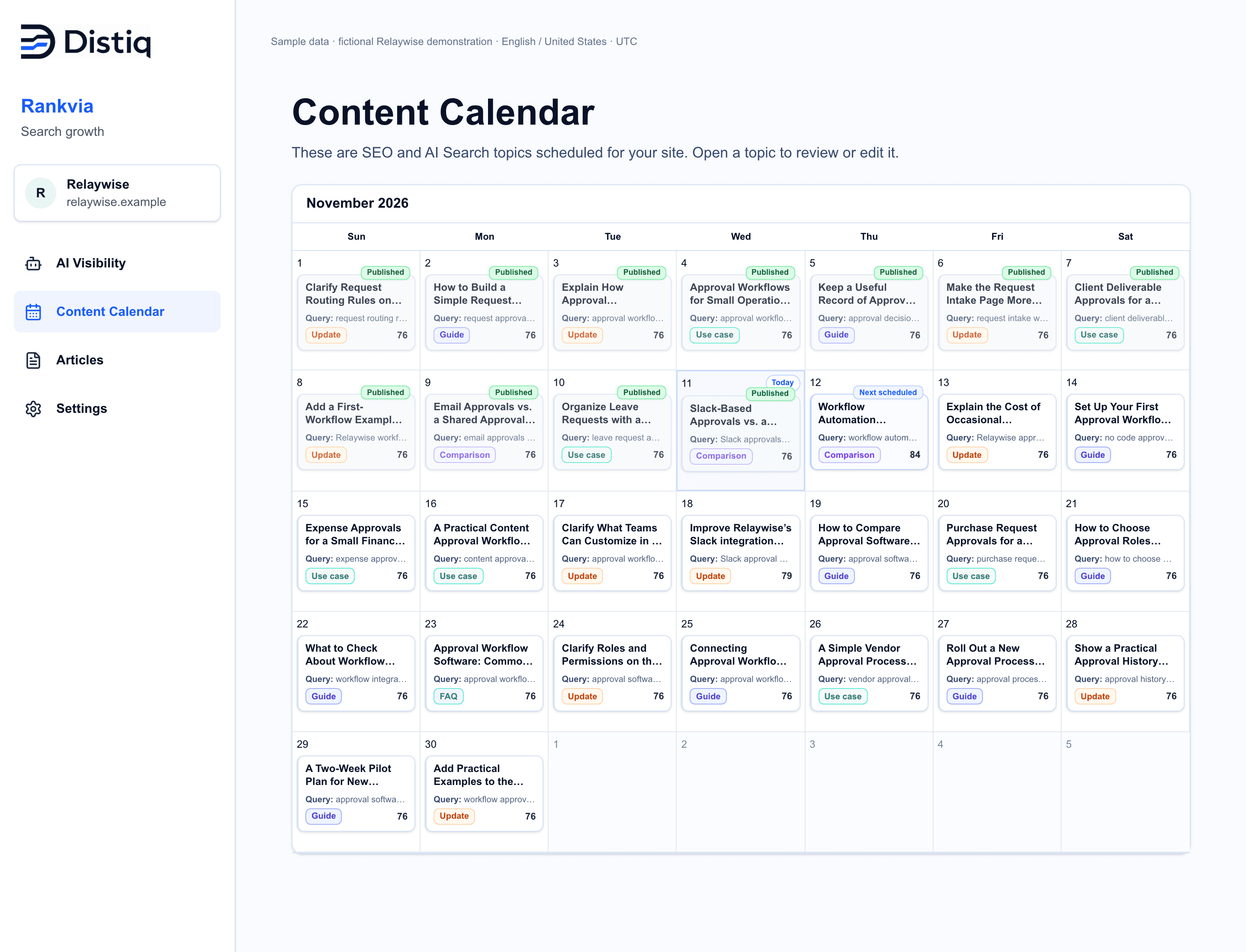
Your output: a prioritized item in a practical sequence. Open it to inspect its Page Plan before generating anything. Learn more about the Content Calendar if you need the planning overview.
Step 4 - Create a detailed SEO Page Plan
Opening a calendar topic brings you to the Page Plan, where Rankvia carries the opportunity into a strategy for the actual page. Review the proposed plan instead of starting a separate generic writing prompt.
Check the target search need and page type first. Then inspect the proposed answer structure, business or product context, metadata and relevant internal links where provided. The exact available fields depend on the selected plan and page.
In the example, the strategy says readers need to compare setup effort, approvals, integrations and pricing. That is an actionable brief: the draft should help someone make that comparison, with a balanced account of where Relaywise fits. It should not become a broad essay about workflow automation.
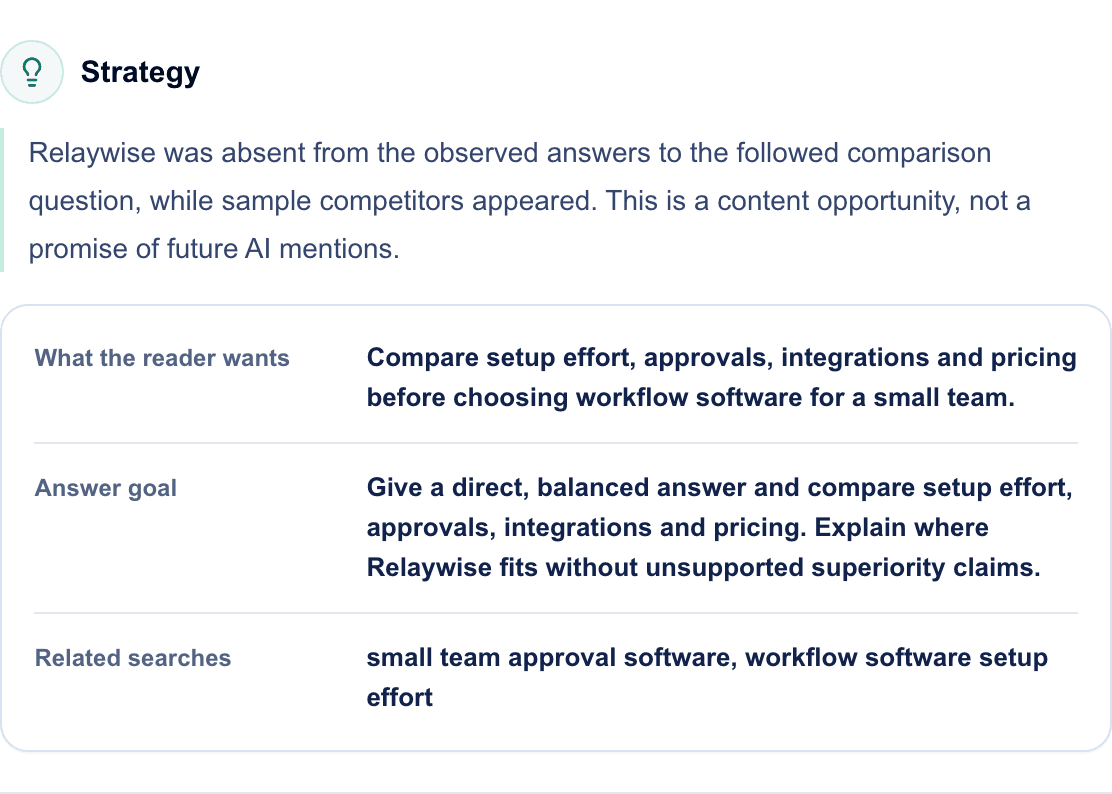
Add concise, factual topic instructions where the interface supports them. For example: “Use only our verified integration list. Do not invent pricing or implementation times.” Supply the facts or approved references the page needs; an instruction to be accurate cannot replace missing evidence.
Your output: a plan with a clear reader, job and review criteria. Correct the plan before asking Rankvia to create the page. The Page Plans documentation explains the supported planning fields.
Step 5 - Generate SEO-ready content
Use the selected item's generation action when its plan is ready and your account is eligible. Rankvia uses the Page Plan and approved business context to generate supported page content, with image, metadata and internal-link context as applicable.
This is where the delegation becomes tangible. You do not stop at a promising opportunity or another brief: Rankvia creates a page you can read, edit and move toward publication.
Open the saved result and compare it with the plan. For Relaywise, check whether the comparison actually addresses setup, approvals and integrations. Verify every claim about the business and any named alternative. Demo content in a screenshot is an example, not research you should reuse on your site.
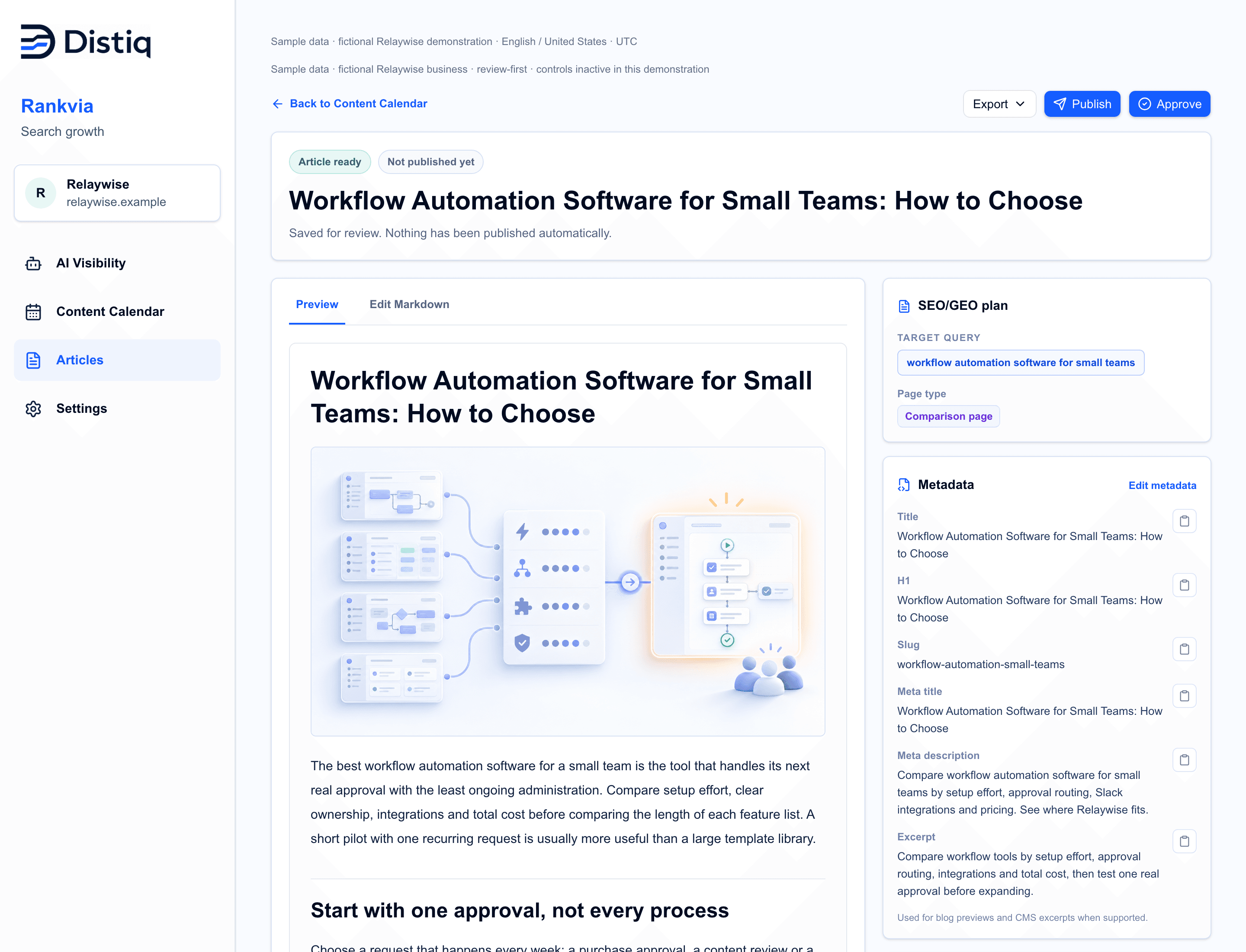
Use the editor to correct the body and save your changes; review and save metadata separately where the interface provides those controls. Check the header image and its alt text when present, as well as headings and internal links. A polished draft still needs business knowledge.
Your output: a saved page ready for editorial review. A generated page in Rankvia is not yet a draft in your CMS or a live URL.
Step 6 - Review, improve and publish
Before approval, read the page as a buyer would. Does it answer the intended question early, add useful information and lead to an appropriate next step?
Review these details:
- Product or service facts, current claims and source support.
- Original usefulness, readability and brand voice.
- Headings, title, description, links, image and alt text.
- Existing-page overlap and the correct destination for the work.
Google's guidance on AI-generated content emphasizes accuracy, quality and relevance, including review of metadata. More generated pages without added value can violate its spam policies.
Open Settings → Content workflow. Under Publishing, choose Review every article before publishing, then Save changes. This is the Review First path: Scheduled → Generated → Review → Publish. Approval is distinct from publication. Confirm the destination and resulting state rather than assuming an approved draft has gone live.
Article creation has its own setting: Generate articles manually or Auto-create scheduled articles. Choose the supported mode that fits your review process and entitlement. Automatic creation can prepare scheduled work for review while publication still waits for your approval.
For WordPress, connect the correct site through its supported WordPress.com or self-hosted flow. For Shopify, confirm the store; select the blog for an article, or the supported page destination. Direct publication requires current entitlement and a ready connection. Use the WordPress publishing guide or Shopify publishing guide for destination-specific setup and fields. If your CMS is unsupported, export usable content as Markdown or HTML for your own publishing process.
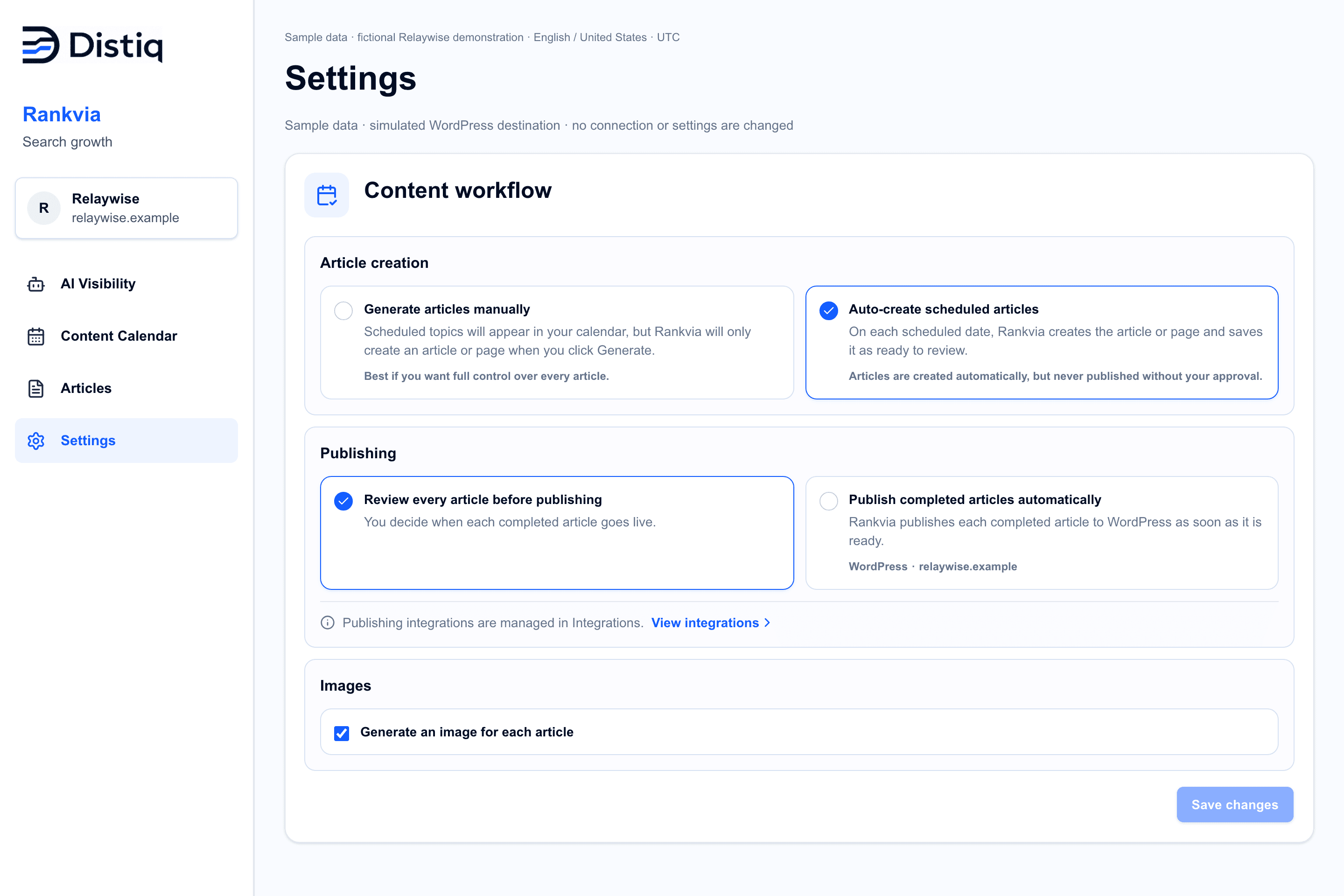
When you want to delegate more, explicitly opt into Autopilot for eligible scheduled content after confirming publishing preferences and the supported destination. A schedule alone does not authorize automatic publication. Required assets and destination readiness still matter. Keep review-first control where individual approval is appropriate.
Your output: reviewed content sent through the intended supported path. Check the recorded CMS state and open the resulting URL after live publication to confirm the correct page, images and links. If publication fails, resolve the reported issue before assuming the work is complete.
Step 7 - Monitor results and keep improving
Record what was published, its URL and the date. Check indexing with the search platform's tools and review available search performance over time. A page being live is different from being indexed, discovered or useful to buyers.
If GSC is connected, use its first-party performance evidence alongside the page's purpose. Review business signals too: whether readers reach the appropriate collection, feature, enquiry or purchase path. Avoid judging a new page only by its first few days or a single AI answer.
When you revisit AI Visibility, read the observation date and available coverage. An earlier snapshot does not become a new measurement because you published a page. Even a later mention cannot by itself prove the page caused it.
If evidence suggests an existing page should better answer a worthwhile opportunity, inspect the Improve recommendation and its Page Plan. This is opportunity-driven improvement, not a promise that Rankvia continuously detects and repairs every declining page. Outcome interpretation and decisions can remain human-led.
Your output: a record of the completed page and the next evidence-based decision: improve, monitor, pursue another opportunity or leave the page alone. Keep this review separate from the production schedule.
What should you automate, and what should you review?
| Work | Rankvia's role | Your role |
|---|---|---|
| Opportunity research | Prepare and organize supported evidence and recommended actions | Confirm relevance, evidence quality and the right page owner |
| Content planning | Prioritize dated work and prepare Page Plans | Review priorities, business context and instructions |
| Content creation | Generate supported drafts from the plan | Verify facts, usefulness, brand voice and page details |
| Publishing | Carry eligible work through configured WordPress or Shopify workflows | Set permissions, approval preferences and the correct destination |
| Performance review | Provide supported search and AI observations where available | Check dates, interpret outcomes and decide what to change |
One AI SEO Agent. From search opportunity to publishable content.
Rankvia is a website-growth autopilot, not just a faster way to fill a document. It can take on recurring decisions about what your site should create or improve, carry selected work into a dated plan and create the page, with eligible supported publication when you choose it.
That changes the work you retain. Instead of repeatedly translating a report into a spreadsheet, a prompt, an outline and a publishing task, you review a direction, a plan and a concrete result. Your judgment goes into the business facts and page quality while Rankvia carries more of the process forward.
Explore the AI SEO Agent workflow or the product overview, then try the sequence on your own website. If you want the broader adoption framework, read what agentic SEO is.
APPLY THIS TO YOUR WEBSITE
Find the next worthwhile page for your website
Let Rankvia analyze your business and prepare search opportunities and an initial content plan. Start with one page you can generate and review.
No credit card required. The preview is not an ongoing free plan.
Frequently asked questions
How do I start using an AI SEO agent?
Submit your website, complete the account and email-verification steps, then review and approve your Business Profile. Inspect the opportunities and Content Calendar, open one Page Plan and generate when it is ready. Start with one reviewable page before expanding the workflow.
Can an AI SEO agent research keywords and create content?
Rankvia uses available search-opportunity evidence, business context and existing website coverage to recommend work, prepare plans and generate supported pages. Optional GSC and AI observations can add context. You still need to check the recommendation and generated result; an interesting keyword does not always warrant a new URL.
Do I need SEO experience to use Rankvia?
You can start without building your own research, prompting and publishing system. You do need to understand your business well enough to approve its facts, priorities and content. Specialist help may still be valuable for technical website issues or complex strategy outside this content workflow.
Can an AI SEO agent publish directly to WordPress or Shopify?
Rankvia supports those destinations when the connection, content and current entitlement are ready. Review-first publication remains available. Automatic publication requires explicit opt-in for eligible scheduled work. Other CMS destinations use your own handoff; generating or approving a page does not make it live.
Should I review AI-generated SEO content before publishing?
Yes. Check accuracy, usefulness, business claims, links, metadata and imagery. Use Review First while establishing your standards. Opt-in automatic publishing changes the handoff, not your responsibility to maintain reliable business context and appropriate quality controls.
Can I use Rankvia without Google Search Console?
Yes. GSC is an optional additional input, not a prerequisite. Rankvia can use approved business context, existing-site coverage and other available search evidence. Connecting GSC can add your own search-performance data, which should remain distinct from estimates or sampled AI answers.
Turn your next opportunity into completed work
Start with one useful page. Let Rankvia establish the business context, propose the right task and carry it through planning and creation. Review the result, choose the appropriate publishing path and keep track of what happens afterward.
The value is more worthwhile SEO content work completed with less recurring coordination. Rankings, traffic, revenue and AI recommendations remain outcomes to earn and measure, not promises attached to an automated draft.
APPLY THIS TO YOUR WEBSITE
Put Rankvia to work on your website
See the opportunities and initial plan Rankvia prepares for your business. Follow your first page from a clear purpose to a draft you can review.
Free preview for eligible websites. Publishing needs current entitlement and a connected, ready supported destination.
Sources
- Rankvia: Getting started
Documented website analysis, Business Profile approval and first-page workflow.
- Rankvia: Page Plans
Review intent, page type, structure, business context and internal connections before generation.
- Rankvia: Publishing
Supported destinations, review and publication requirements.
- Google Search Central: Generative AI content
Accuracy, useful original content and human review before publication.