
Guides Shopify collection page SEO: Make your category easier to browse and understand
SHOPIFY COLLECTION PAGE SEO
Shopify collection page SEO: Make your category easier to browse and understand
Learn how to optimize Shopify collection pages with better assortment, category copy, filters, faceted navigation, internal links, and Search Console evidence.
By Rankvia ·
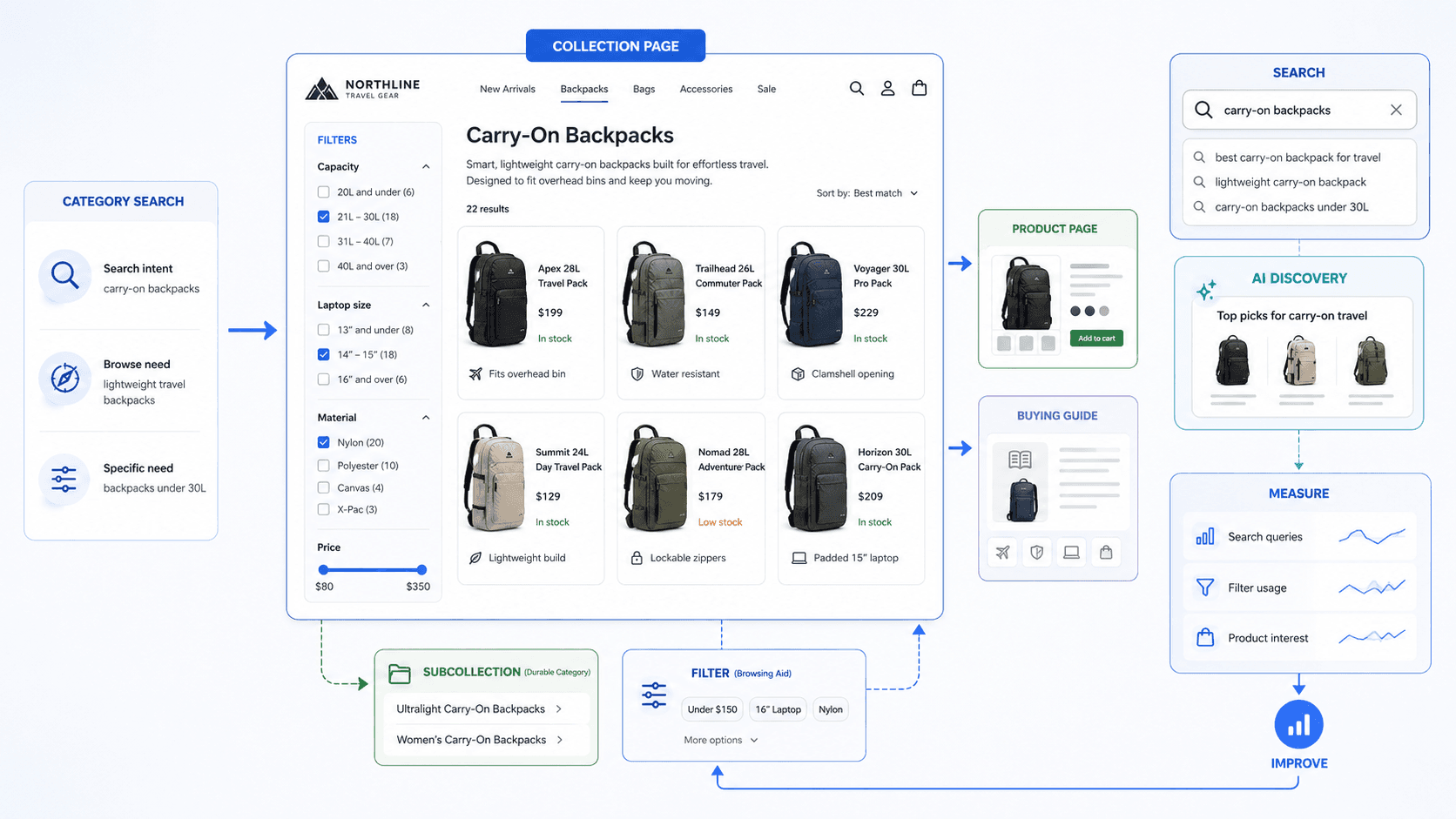
This guide starts after one important decision has already been made: the collection is the right page to own the category.
Someone searching for carry on backpacks probably wants to browse several relevant products. That is a different job from a query for one exact backpack model, and different again from how to choose a carry on backpack. If you are still deciding which kind of page should own the search, the broader Shopify SEO guide covers that decision first.
Once the collection is the right owner, optimizing it means more than adding the phrase to an H1 and writing a few hundred words around the grid. The assortment itself is part of the answer. So are the filters, subcategories, prices, availability, internal links, and the technical paths search engines use to reach the products.
Shopify collection page SEO is the process of making a collection the clearest and most useful browse and search destination for a meaningful category of products.
The difficult part usually appears as the catalog grows. Filters that are perfectly useful to shoppers can generate large numbers of URLs, and some subsets begin to look important enough to deserve their own category pages. Shopify's Search & Discovery system gives merchants substantial filtering flexibility, while Google explicitly warns that faceted navigation can create very large URL spaces when combinations are left uncontrolled.
The Shopify Collection Page SEO lifecycle
- CATEGORY INTENT
- COLLECTION IDENTITY - What category is this?
- ASSORTMENT - Do the products actually answer the category?
- PRODUCT DISCOVERY - Can shoppers understand and narrow the choices?
- FILTERS / SUBCOLLECTIONS - Which subsets are navigation and which deserve pages?
- CATEGORY CONTEXT - What does someone need before browsing or choosing?
- STORE CONNECTIONS - Products + guides + hierarchy
- CRAWL / INDEX CHECK - Can important URLs be found without unnecessary URL sprawl?
- SEARCH EVIDENCE - What is actually happening?
- IMPROVE - What should change?
That sequence helps because collection problems are often diagnosed at the wrong layer. A team rewrites the description when the assortment is weak, creates another collection when a filter would have been enough, or changes metadata while products beyond the first load are barely crawlable.
Collection-page SEO starts with the category, not the keyword
A collection exists to organize a meaningful group of products.
Shopify lets merchants create and edit collections, control their product or variant sources and conditions, set descriptions and images, choose product ordering, manage availability and templates, and edit the search-engine listing. Shopify is currently rolling out a new collections model that replaces the legacy manual/smart collections model, although stores that do not have the new model yet can continue using the legacy versions.
The useful SEO question is not whether a phrase can be turned into a collection name. It is whether the page genuinely represents the group of products somebody expects to browse.
Consider three searches:
carry on backpacks
Venture Pro 28L backpack
best carry on backpack for Europe
The first usually points toward a category. The second is much more product-specific. The third may be better served by a buying guide or comparison because the person is still working through selection criteria.
Those are useful patterns, not rigid rules. The current search results, the assortment, and how customers actually shop can all change the answer.
Once a collection has earned ownership, its job is straightforward in principle: define the category, present an assortment that actually belongs there, and help the shopper narrow that assortment without creating unnecessary complexity around it.
Make the category immediately understandable
Collection naming often gets messy because the business knows its internal taxonomy better than the customer does.
A merchant may have an internal category called:
Urban Mobility
that happens to contain commuter backpacks.
If shoppers understand those products as:
Laptop Backpacks
the internal merchandising label may not be the best public category name.
Name the category the way shoppers distinguish it
A useful collection name is descriptive without trying to absorb every modifier the page might eventually rank for.
Good:
Carry-On Backpacks
Potentially useful where the distinction is real:
Women's Trail Running Shoes
Too broad:
Travel
Stuffed:
Best Carry-On Backpacks Travel Bags Lightweight Carry On Luggage Backpacks
The category name should help somebody understand what they are about to browse.
H1 and SEO title can differ without becoming different topics
Shopify lets merchants edit a collection's search-engine page title, meta description, and URL handle separately from its main storefront content.
That can be useful when the search result needs a little more context.
For example:
Collection H1
Carry-On Backpacks
SEO title
Carry-On Backpacks for Travel | WildHorizon
There is no requirement to make them different. The useful objective is that the page title, H1, collection content, and assortment continue describing the same category.
Keep established URLs stable
A durable collection URL might be:
/collections/carry-on-backpacks
Changing it to:
/collections/best-carry-on-backpacks-for-air-travel
for a modest keyword variation is rarely compelling.
Shopify allows the handle to be changed and provides an option to create a redirect from the old URL. Shopify also cautions against editing collection handles too often because doing so can interfere with search visibility.
A useful collection URL should survive changes in keyword phrasing and merchandising fashion.
Treat the assortment as part of the collection's content
Collection SEO is sometimes discussed as though the products appear after the optimization has been done.
They do not.
If a collection targets waterproof hiking jackets but much of the grid contains casual windbreakers and insulated city coats, the problem is not a missing paragraph about waterproof hiking jackets. The assortment itself is weak for the category.
The same issue shows up in less obvious ways. A Carry-On Backpacks collection might include genuine cabin-size travel packs, a few 45L hiking bags, and several small laptop backpacks simply because all of them share a travel condition. Technically, the collection works. As a category, it becomes harder to understand.
Make the product grid readable
Product names should help someone compare what they are seeing.
A grid containing:
Venture Metro Trail Transit
may work for people who already know the range. New shoppers have to open every PDP to find out what differs.
Names such as:
Venture 28L Carry-On Backpack
Metro 18L Laptop Backpack
Trail 35L Hiking Pack
do more work at the collection level without turning the product title into an SEO paragraph.
Individual product naming still belongs primarily to the Shopify Product Page SEO guide.
Images, price and availability are part of browsing too
The right product-card information depends on the category.
For running shoes, shoppers may need to distinguish trail and road models visually. For sofas, scale, shape, material, and price may matter more. In a replacement-parts category, model names and compatibility may do more of the work than the photography.
Availability also changes the experience. A collection can technically contain the right products while becoming frustrating if most of the first screen is sold out.
Sorting is partly merchandising judgment
Shopify currently provides sorting options including relevance based on sales performance, best selling, title, price, age, and manual ordering.
There is no universal SEO rule that one of those modes must always come first.
The stronger starting point is usually to make the category useful: show products that represent it well and can actually be bought, while still allowing commercial priorities to influence the order.
Add enough collection context to help someone browse
Collection descriptions attract a lot of arbitrary rules because word counts are easy to prescribe.
Write 500 words.
Put 1,000 words below the grid.
Mention the keyword three times.
Those rules are simpler than deciding what the shopper actually needs, but they are not better.
Google's current guidance explicitly rejects the idea of an ideal page length, including for generative Search. The amount of collection copy should depend on how much explanation the category needs.
What belongs above the product grid
Put information before the products when somebody benefits from knowing it before they browse.
For example:
Carry-on backpacks designed for cabin travel, with options from 20L to 35L, laptop compartments up to 16 inches, and both personal-item and overhead-bin formats.
That establishes useful boundaries quickly.
A long explanation of airline-baggage history would mostly push the assortment downward, especially on mobile.
Some categories genuinely need more context
A skincare-cleansers collection may need to explain the difference between oil, balm, cream, and foaming cleansers because that distinction changes how somebody browses.
A replacement-parts collection may need compatibility guidance before the grid makes much sense at all.
The useful amount of copy therefore depends on the decision.
What can sit below the grid
Deeper category information can appear later when it remains useful but is not necessary before somebody starts browsing.
That could include additional selection guidance or links to a detailed buying guide.
The test remains the same: would a real visitor who reached this part of the page find it useful?
Below-grid text should not become invisible storage for search phrases.
Use filters for narrowing - not automatically for creating search pages
Filters are useful because broad collections rarely match every shopper's constraints.
Shopify Search & Discovery can use attributes including availability, category, price, product type, tags, vendor, product options, metafields, and metaobjects for storefront filtering, depending on theme and configuration. Shopify currently limits filter display on very large collections and requires compatible storefront/theme support.
A running-shoe collection might reasonably offer terrain, size, cushioning, gender, and price. A sofa category may need width, upholstery, seating capacity, color, and price.
Those controls help people narrow the assortment.
Problems begin when the business assumes that every useful filtered state also deserves to become a permanent search landing page.
A shopper may care deeply about blue sofas today. That does not automatically mean Blue Sofas deserves its own maintained collection, place in the architecture, internal links, and search ownership.
Sometimes it does.
That is the decision worth making.
Decide when a subset deserves its own collection
A dedicated collection is most useful when the subset represents a durable browse decision rather than merely an available attribute.
Filter vs Dedicated Collection Decision Framework
- USEFUL PRODUCT SUBSET?
- STABLE CUSTOMER/BROWSE NEED? - No: filter. Yes: assess independent search and navigation value.
- INDEPENDENT SEARCH / NAVIGATION VALUE? - No: filter. Yes: assess assortment.
- ENOUGH COHERENT ASSORTMENT? - No: filter. Yes: dedicated collection.
This is a way to organize the judgment, not an algorithm.
Blue
For many stores, color works perfectly well as a filter.
The fact that customers care about blue does not mean the business needs a permanent /collections/blue-products architecture.
Carry-On Backpacks
This is different. A travel retailer may have twenty products intentionally designed around cabin baggage, with specific size constraints, product features, and customer demand.
That can justify a durable category independent of keyword data.
Women's Trail Running Shoes
This might deserve its own collection in a large running retailer where the assortment, navigation, and customer demand make it a stable category.
On a small store carrying four trail shoes in total, the same label may simply be an unnecessary subdivision.
Sofas Under €1,000
This one can go either way.
One retailer may merchandise a permanent budget range and link to it from navigation. Another may have prices changing frequently enough that it works better as a dynamic filter.
Green Velvet 3-Seater Sofas Under €937
Somebody may genuinely want that combination.
That does not automatically mean the business should preserve it as a permanent indexable URL.
The narrower and more transient the combination becomes, the more likely it is describing the state of one browsing session rather than a durable category.
Control faceted navigation before filters create a URL problem
Faceted navigation is the system created when shoppers combine filters to produce progressively narrower product sets.
It is one of the most useful pieces of ecommerce UX.
It can also produce a large technical footprint.
Imagine a backpack collection with several colors, capacity ranges, materials, price bands, laptop sizes, and feature filters. Each control is reasonable. Their possible combinations can number in the thousands.
Google's current faceted-navigation guidance warns that parameter-based filtering can generate very large or effectively infinite URL spaces. Crawlers can spend substantial time exploring low-value combinations instead of discovering more important URLs efficiently.
Separate the decisions
For any filter state, it helps to distinguish four questions:
Should shoppers be able to select it? Should selecting it create a distinct URL? Should Google crawl that URL? Should it be eligible to become an indexed search landing page?
Stores often jump from the first question directly to the fourth.
Facet Handling Matrix
| URL type | User value | Independent search ownership | Strategic treatment |
|---|---|---|---|
| Main collection | High | Strong | Crawl and index |
| Stable meaningful subcategory | High | Potentially strong | Consider dedicated collection |
| Single session filter | High | Often low | Navigation first |
| Sort URL | UX only | Usually none | Avoid treating as search page |
| Multi-filter combination | Often session-specific | Usually low | Control URL space |
| Empty/nonsensical combination | None | None | Do not preserve as useful search URL |
The technical implementation depends on the store. A small catalog with a handful of predictable combinations is not the same problem as a large retailer exposing millions of parameter combinations.
Crawlability and indexability are not the same thing
noindex, robots.txt, and canonical tags solve different problems.
A noindex directive tells Google not to index a page once Google is able to crawl it and see the instruction.
robots.txt controls crawling.
A canonical indicates which URL should generally be treated as the preferred representative among duplicate or near-duplicate URLs.
Google's current faceted-navigation documentation says that when facet URLs do not need potential Search visibility, preventing their crawl can be appropriate. It also says canonical and nofollow approaches are generally less effective in the long term for controlling large facet crawl spaces.
That is not a universal instruction to block every Shopify filter parameter. The size and shape of the URL space matter.
Canonicals do not remove the underlying URL explosion
A filtered URL can point its canonical at the parent collection.
Google may still discover and crawl many of those URLs before consolidation reduces the crawling over time.
When the actual problem is hundreds of thousands of low-value combinations, canonicalization alone does not simplify the architecture that produced them.
Give real categories deliberate ownership
If a subset deserves organic visibility, it is often cleaner to give it a durable category page.
Waterproof Hiking Jackets
may deserve its own maintained collection when the store carries a meaningful assortment and customers genuinely browse that category.
That gives the merchant a page they can name, merchandise, internally link, maintain, and measure deliberately rather than depending on an accidental filtered state.
Empty combinations need sensible handling
Google currently recommends returning a real 404 for facet combinations that produce no results or are otherwise nonsensical when those URL spaces are exposed to crawling.
A site that generates thousands of successful 0 products URLs is creating technical inventory without creating useful category inventory.
Make pagination and infinite scroll crawlable
Large collections often need pagination, Load More, infinite scrolling, or some combination of them.
All can work for users.
The SEO question is whether products beyond the initial load remain discoverable through URLs and links a crawler can follow.
Google generally discovers deeper ecommerce content through links in href attributes and does not normally click buttons or trigger user-dependent JavaScript actions to reveal more products.
Paginated pages need distinct URLs
Google currently recommends that each page in a paginated sequence have a unique URL and its own canonical. It explicitly says not to use the first page as the canonical for all subsequent pages.
A structure such as:
/collections/running-shoes?page=2
is normal.
That deeper page may expose product links that are not present on page 1.
rel=next and rel=prev
Google no longer uses these tags as pagination signals, although other search engines may still consume them.
Restoring them should not be presented as a current Google SEO requirement.
Infinite scroll can be fine
The interface may load more products automatically as somebody scrolls.
Behind that experience, products still need crawlable discovery paths where they are meant to be found.
A custom Shopify theme can provide smooth infinite scrolling while retaining sequential paginated URLs underneath. The implementation needs to be inspected rather than inferred from how the collection looks to a user.
Avoid creating collections that represent the same decision
Collections often multiply when every new search modifier starts looking like another landing-page opportunity.
Consider:
/collections/travel-backpacks
/collections/carry-on-backpacks
/collections/backpacks-for-travel
The first two might be genuinely different. Carry-On Backpacks could represent a constrained cabin-travel subset while Travel Backpacks includes larger bags and other travel-focused packs.
Backpacks for Travel, however, might show almost exactly the same inventory as Travel Backpacks and exist largely because the phrase looks different in keyword research.
The useful question is whether somebody would make a different browsing decision on the two pages.
Look at the actual assortment, category definition, internal navigation, search intent, and customer expectations.
The practical problem is not a mythical duplicate-content penalty. It is that the store has created multiple possible owners without giving shoppers or search systems much reason to distinguish their jobs.
If two collections do the same job, consolidation may be cleaner than inventing more copy to differentiate them.
Keep category information on the collection and broader decisions in supporting content
Collection descriptions often grow because the merchant keeps finding adjacent questions worth answering.
A Carry-On Backpacks collection starts with category context.
Then the team adds airline dimensions, backpack capacity, laptop compatibility, packing advice, materials, European airline rules, and eventually a comparison between 28L and 40L bags.
At some point, the collection has become an article with products underneath it.
Collection vs Product vs Guide Matrix
| Customer need | Collection | Product | Guide |
|---|---|---|---|
| Browse a category | Primary | No | Optional support |
| Compare the assortment | Yes | No | Sometimes deeper guide |
| Exact product facts | No | Primary | Usually no |
| Basic category differences | Yes | Maybe | Sometimes |
| How to choose the category | Brief | No | Primary |
| Product A vs Product B | Brief | Product context | Comparison page |
| Deep education | Minimal | Minimal | Primary |
| Product-specific compatibility | No | Primary | Complex cases |
There is room for overlap.
A Carry-On Backpacks collection can explain that its range spans 20L to 35L and then link to a deeper guide about choosing backpack capacity.
The collection helps somebody browse within the category. The guide handles the broader decision.
For supporting editorial execution, see Shopify Blog SEO. For exact product information and PDP optimization, see Shopify Product Page SEO.
Connect important collections through the store hierarchy
An important collection should not exist only because someone knows its URL or because it appears in the XML sitemap.
Google says it analyzes page relationships through links and specifically recommends ecommerce structures that connect menus to category pages, categories to subcategories, and subcategories to product pages. Google also notes that a search box is not a substitute because Googlebot generally does not perform internal searches to discover products.
A useful structure might look like:
- HOME / NAVIGATION
- COLLECTION
- SUBCOLLECTION
- PRODUCT
- BUYING GUIDE ↔ COLLECTION
Not every collection needs a position in the main navigation. Some may be linked from a parent collection, a relevant guide, a seasonal merchandising page, or another useful part of the site.
Parent and child categories should reflect real distinctions
Backpacks
might reasonably lead to:
Carry-On Backpacks Hiking Backpacks Laptop Backpacks
Those categories represent meaningfully different shopping needs.
A hierarchy of:
Backpacks Best Backpacks Popular Backpacks Great Backpacks
is mostly wording.
Supporting content can reinforce category structure
A buying guide about airline-compatible luggage can link to the Carry-On Backpacks collection when the reader is ready to browse.
The collection can link back to that guide when the shopper needs more help choosing.
The relationship should make sense for the shopper before it is justified as an SEO tactic.
For deeper implementation, see Internal Linking.
Use structured data where it describes something real
Structured data can clarify a page and its hierarchy.
It should remain secondary to getting the collection itself right.
BreadcrumbList
Breadcrumb markup is a natural fit when the site has a meaningful category hierarchy.
For example:
Home > Backpacks > Carry-On Backpacks
Google supports BreadcrumbList to describe page hierarchy and can use breadcrumb information in Search presentation.
CollectionPage
CollectionPage exists as schema.org vocabulary.
That does not make it a standard Google collection rich-result type or a ranking shortcut.
Use semantic markup when it accurately describes the page, not because the type sounds commercially useful.
ItemList and Google's carousel beta
Google currently documents a beta carousel rich result that can use ItemList with Product on eligible summary or category pages. The feature is currently limited to the EEA, Turkey, and South Africa, with shopping availability varying by region. Google also requires summary/category pages to link to standalone detail pages, and has specific handling guidance for paginated and infinite-scroll lists.
It is worth being aware of.
It is not a reason to rebuild collection architecture around a beta Search format.
Product markup belongs to products
The collection contains product entities.
The collection itself is not one giant Product.
Product-specific markup should describe the actual product entities rather than disguising a category page as a PDP.
Handle out-of-stock products without damaging the collection
There is no universal answer to whether sold-out products should stay in a collection.
Imagine a collection with 30 backpacks and three temporarily unavailable products. Keeping them visible may be perfectly reasonable if restock is expected, customers still compare them, or the products remain important destinations.
Now imagine 18 of the first 24 products are unavailable.
The category can be technically accurate and still be miserable to shop.
In that case, demoting unavailable items, changing collection conditions, or removing some items from the active assortment may make more sense. Shopify's current collection model can use conditions and explicit inclusions/exclusions to control membership.
One SEO consideration remains important: if a product should continue to be discovered, do not accidentally remove every crawlable internal path to it.
Google explicitly recommends category-to-product links for products merchants want Search to discover.
Permanently discontinued products need their own product-level decision, which is covered in Shopify Product Page SEO.
Use Search Console to decide what the collection should improve
Search Console becomes useful when it changes the diagnosis.
A Carry-On Backpacks collection may start receiving impressions for:
lightweight carry on backpacks small carry on backpacks 30L carry on backpacks carry on backpack with laptop compartment
Those queries do not all require a new collection or another paragraph of copy.
Search Console's Performance report exposes queries, pages, clicks, impressions, CTR, and average position. Google also recommends investigating low-CTR pages by checking whether titles, descriptions, and page content align with the queries showing the page.
Collection Search Console Improve Flow
- COLLECTION
- SEARCH CONSOLE
- CATEGORY + MODIFIER QUERIES
- WHAT IS THE PATTERN?
- OUTCOMES - Improve collection; create subcollection; PDP owner; supporting guide; technical issue; internal-link issue; no action.
Suppose lightweight carry on backpacks appears consistently and the collection already contains several products where weight is a meaningful distinction.
The page may simply need a better way to expose that information, perhaps through the grid, a filter, or a little category context.
If the store carries fifteen products built specifically around lightweight travel and customers genuinely browse that segment, a dedicated subcollection becomes more plausible.
If weight is mostly a temporary constraint shoppers use to narrow the main category, keeping it as a filter may still be cleaner.
And if the query is:
how light should a carry on backpack be
the user is no longer primarily asking to browse a category. A guide may be the better owner.
A collection appearing for an exact model name can raise the opposite question: perhaps the PDP needs stronger product-level ownership.
Technical issues can produce the same symptoms too. Broken pagination, changed internal links, unexpected canonicals, or a theme that stopped exposing deeper products cannot be repaired by rewriting the collection description.
Rankvia's Google Search Console integration uses existing queries, pages, and search-performance evidence as first-party context when deciding what should be created, improved, or prioritized.
Explore Rankvia's Google Search Console integration.
What AI search changes at collection-page level
AI search does not require a second version of the collection page.
Clear category terminology, useful public context, crawlable navigation, and coherent relationships between categories and products remain helpful because systems interpreting the public site still need to understand what the page represents.
Google's July 2026 guidance says its generative Search experiences remain rooted in core Search ranking and quality systems, do not require special AI schema, and do not require rewriting content into tiny chunks or creating pages for every possible query variation.
There is also a useful distinction between the public collection page and Shopify's product-discovery infrastructure.
OpenAI currently states that Shopify product data is already integrated into ChatGPT through Shopify Catalog. Product results are selected independently based on user intent and available product and merchant information.
So adding another 800 words to a collection description should not be presented as a way to make the products rank in ChatGPT shopping.
The collection's broader AI-search value is more conventional: it provides public category context and makes the relationship between the assortment, subcategories, supporting content, and products easier to interpret.
For the wider system, see Shopify AI Search Optimization.
Collection SEO and conversion often improve the same browsing experience
SEO and conversion optimization are different disciplines, but collection pages create a lot of overlap between them.
A clearly defined collection with a relevant assortment is easier for a shopper to use and easier for a search system to interpret.
Useful filters, sensible subcategories, accurate availability, understandable product names, and appropriate category guidance can all improve the browsing experience while reinforcing what the page is about.
The overlap weakens once we move into interface experimentation.
Quick-add behavior, card density, promotional badge styles, urgency messaging, and hover states may matter commercially. They are not automatically collection SEO questions because they happen on a category page.
The shared ground is product discovery.
Can somebody understand what this category contains and move efficiently toward the right product?
Turn collection optimization into an ongoing ownership decision
Collection architecture changes as the store changes.
A category that felt unnecessary with four products may become useful after the assortment grows to twenty. A filter can start revealing a stable category customers repeatedly browse. Automated conditions can make a collection gradually less coherent as new products enter the catalog. A theme update can change pagination behavior without anybody thinking of it as an SEO change.
Search behavior changes too.
None of that means every collection needs a scheduled rewrite.
The useful trigger is evidence that the category, assortment, search demand, internal architecture, or technical behavior has changed enough to justify a decision.
That decision might be to improve the existing collection, create a durable subcollection, consolidate two overlapping collections, adjust filtering, fix crawlability, create supporting content, improve a PDP, or leave the page alone.
A useful category system evolves through decisions, not through continuous production of URLs.
How Rankvia fits
Collection pages are a good example of why deciding what should exist often matters more than generating another page.
Rankvia checks candidate opportunities against business fit, buyer intent, existing website coverage, and search evidence. Its Content Calendar can recommend a new page, an improvement to an existing page, or no additional page when the intent is already sufficiently covered.
That makes collection ownership relevant to the planning process. An existing collection may already be the right owner and need improvement. A genuinely distinct subcategory may deserve a new page. A product-specific or educational query may belong elsewhere entirely.
Connected Search Console evidence can add first-party query and page context to that decision. Rankvia's Page Plans then define the buyer query, page role, objective, answer strategy, business context, and relevant existing pages before Rankvia-generated content is created.
Rankvia can also use existing-site context to place relevant internal links inside the content it plans and generates.
There is an important boundary to keep clear: Rankvia's current Shopify publishing workflow should not be presented as automatically editing or publishing Shopify collection records.
Its current Shopify integration documents reading store content and available blogs, creating/updating articles and pages, and publishing supported articles and pages. It also explicitly says it does not access theme or storefront settings.
Collection changes described in this guide may therefore still need to be implemented manually inside Shopify.
Rankvia's role here is the surrounding planning layer: determining whether a collection should own the opportunity, whether it should Improve, whether another durable page genuinely deserves to exist, and what supporting content should connect to it.
See Rankvia for Shopify.
Shopify collection-page SEO checklist
Use this as a review tool, not a scoring system.
Category identity
- The collection represents a genuine browse or category need.
- The H1 clearly identifies the category.
- The SEO title describes the same category.
- Important modifiers reflect real distinctions.
- The URL is readable and stable.
- The category was not created solely to target a wording variation.
Assortment
- Products actually belong in the category.
- The assortment is coherent enough to justify the collection.
- Product names make the grid understandable.
- Images help shoppers distinguish choices.
- Price and availability are accurate.
- Product ordering creates a useful starting view.
Collection context
- The description clarifies the category where needed.
- Important context appears before the grid only when shoppers need it before browsing.
- Deeper below-grid content remains genuinely useful.
- The page has not been padded to reach a word count.
- Broad educational content has not swallowed the category page.
Filters
- Filters reflect meaningful product attributes.
- Filter labels make sense to customers.
- Filter values are clean and useful.
- The store is not exposing unnecessary controls simply because the data exists.
- User-facing filters are not automatically treated as SEO landing pages.
Subcollections
- Dedicated subcollections represent stable customer needs.
- They have coherent assortments.
- They provide durable navigation or search value.
- They can be maintained as the catalog changes.
- Narrow temporary combinations remain filters unless evidence supports more.
Faceted navigation
- The team understands which URLs filter combinations create.
- Large parameter combinations have been audited.
- Crawl and index decisions are treated separately.
- Canonicals are not being used as the only response to a major crawl-space problem.
- Sort URLs are not accidentally treated as meaningful search pages.
- Empty or nonsensical combinations are handled appropriately.
Pagination and incremental loading
- Deeper products remain reachable through crawlable paths.
- Paginated pages use distinct URLs.
- Page 2+ does not blindly canonicalize to page 1.
- Sequential links are crawlable.
- Infinite-scroll or Load More implementations expose underlying discoverable pages where required.
- The store does not rely on rel=next/prev as a current Google pagination requirement.
Duplicate collections
- Similar collections represent different buyer decisions.
- Product overlap has been reviewed.
- Wording differences alone are not being treated as new categories.
- Redundant collections are consolidated where appropriate.
Internal architecture
- Important collections are reachable through normal site navigation.
- Parent and child category relationships are logical.
- Products have crawlable links from relevant collections.
- Buying guides link to collections when the next step is product browsing.
- Collections link to deeper guidance where shoppers need it.
- Breadcrumbs accurately describe the hierarchy.
Structured data
- Breadcrumb markup reflects the real hierarchy where implemented.
- CollectionPage is not being treated as a magic rich-result tactic.
- Product markup describes actual product entities.
- Current ItemList carousel-beta requirements and availability are checked before implementation if relevant.
Availability
- Out-of-stock products do not overwhelm useful inventory.
- Temporarily unavailable products are handled deliberately.
- Discontinued products are reviewed separately.
- Products the merchant still wants discovered retain crawlable internal paths.
Search Console
- Collection queries are reviewed by page and query.
- Category modifiers are evaluated for actual intent.
- New modifiers do not automatically become collections.
- Product-specific queries trigger a page-owner check.
- High impressions and weak CTR are diagnosed before rewriting.
- Declines trigger investigation rather than automatic refresh.
Improve
- The team distinguishes copy problems from assortment problems.
- Technical issues are not treated as content issues.
- Filters remain filters when that creates cleaner architecture.
- New collections are created only when they earn a durable role.
- Existing collections are improved rather than duplicated where appropriate.
Shopify collection-page SEO FAQ
What is Shopify collection page SEO?
Shopify collection page SEO is the process of making a collection the clearest and most useful browse and search destination for a meaningful category of products.
It includes category identity, assortment, collection context, filters, subcategories, crawlability, internal architecture, and evidence-driven improvements.
How do I optimize a Shopify collection page for SEO?
Start with the category itself. Make sure the collection represents a real browse need and contains a relevant assortment, then clarify the category, improve product discovery, use filters deliberately, keep important products crawlable, connect the collection to the rest of the site, and use Search Console to diagnose what should change.
Adding more collection copy is not automatically the first or best action.
How long should a Shopify collection description be?
There is no universal ideal length.
Use enough text to define the category, explain meaningful distinctions, and help shoppers browse without padding the page.
A simple category may need only a sentence or two. A more complex one may require additional guidance.
Should a Shopify collection description go above or below the products?
Put information above the grid when shoppers need it before they can browse intelligently.
Deeper category context can appear below the grid when it remains useful but would otherwise delay the products.
There is no general Google rule requiring collection copy to appear entirely above or below the product grid.
Should Shopify filter pages be indexed?
Not every filtered state deserves independent search visibility.
A subset is a stronger candidate for a permanent search landing page when it represents a stable customer need, has a coherent assortment, and deserves ongoing navigation and search ownership.
Temporary browsing states usually do not need that role.
The technical implementation depends on the store's filter architecture and crawl/index strategy.
Are Shopify filter URLs bad for SEO?
No. Filters are useful product-discovery tools.
The problem appears when filters generate very large numbers of crawlable or indexable combinations with little independent value. Google specifically warns that faceted navigation can create effectively infinite URL spaces and consume crawl resources.
Should I create a Shopify collection for every keyword?
No.
A collection should represent a durable category or browse need, not simply a phrase discovered during keyword research.
Depending on the intent, the better owner may already be an existing collection, a product page, a filter, a buying guide, or no new page at all.
Should a keyword target a product page or collection page?
Product-specific intent usually fits a PDP, while category or browse intent more often fits a collection.
For example:
Venture Pro 28L backpack
is product-specific.
carry on backpacks
is category-level.
The actual search results, assortment, and site architecture still need to support that decision.
How should Shopify collection pagination work for SEO?
Google recommends unique URLs for paginated pages and a canonical URL for each page rather than canonicalizing every deeper page to page 1. Google no longer uses rel=next/prev as a pagination signal.
If the storefront uses infinite scroll or Load More, important products should still have crawlable discovery paths because Google generally does not click interactive controls to reveal additional results.
Should out-of-stock products stay in Shopify collections?
It depends on the product and the collection.
Keeping temporarily unavailable products can make sense when they remain useful for comparison, are likely to return, or still deserve discovery. Demoting or removing them from the active collection can improve browsing when unavailable inventory overwhelms products customers can actually buy.
Avoid removing every crawlable internal path to a product you still want discovered.
Do Shopify collection pages need structured data?
Structured data should accurately describe the page rather than being added because a schema type sounds SEO-friendly.
BreadcrumbList can help express category hierarchy. CollectionPage should not be presented as a special Google collection ranking or rich-result advantage.
Google currently also documents an ItemList carousel rich result in beta for eligible category/summary pages in limited regions, including shopping queries in some supported markets. It is an evolving Search feature, not a general collection SEO requirement.
How can Search Console help improve Shopify collection pages?
Search Console can show the queries associated with a collection along with impressions, clicks, CTR, average position, and page-level performance.
Those patterns can help determine whether the next action should be improving the current collection, creating a durable subcollection, strengthening a PDP, publishing supporting content, fixing a technical problem, improving internal links, or doing nothing.
A new query is evidence to investigate, not an automatic instruction to add the phrase to the description.
APPLY THIS TO YOUR WEBSITE
See which Shopify pages should be improved - and which new opportunities deserve a page
A growing Shopify store creates plenty of possible URLs: collections, products, filters, guides, comparisons, and new category ideas. The useful part is deciding which ones actually deserve to own a search need. Rankvia analyzes the existing website and business context, identifies relevant opportunities, checks existing page coverage, and can use Search Console evidence where connected to help distinguish Create, Improve, and no-new-page decisions. It can then plan and create supporting search pages around those priorities while keeping their internal relationships to the rest of the site in context. Changes to Shopify collection records, filters, templates, or faceted-navigation configuration may still need to be implemented manually in Shopify.
Personalized to your website. No credit card required.
Sources
Shopify
- Collections - Current collection model and rollout.
- Creating collections and adding products - Conditions, exclusions, products and variants, sorting, metafields, templates, availability, and SEO listing.
- Editing collection details and layout - Collection name, description, image, ordering, and layout behavior.
- Managing collection settings - Availability, template, SEO title/meta, handles, and redirects.
- Search & Discovery filters - Filter types, values, theme requirements, and platform behavior.
- Managing crawling of faceted navigation URLs - Facet crawl-space control.
- Pagination best practices - Pagination and infinite scroll.
- Ecommerce website structure - Category, subcategory, and product linking.
- Breadcrumb structured data - Hierarchy.
- Structured data carousels beta - Current ItemList + Product beta.
- Generative AI Search optimization guidance - Current AI-search principles.
- Search Console Performance report - Queries, pages, clicks, impressions, CTR, and position.
OpenAI
- Shopping with ChatGPT Search - Product-selection and Shopify Catalog context.
- Shopping from Shopify merchants in ChatGPT - Shopify-specific merchant guidance and the Shopify Catalog relationship.
Rankvia
- Content Calendar - Existing-site coverage and Create/Improve/no-new-page decisions.
- Page Plans - Buyer query, page role, objective, business context, answer strategy, and existing pages.
- Internal Linking - Existing-site context and generated-content links.
- Google Search Console integration - First-party search evidence.
- Rankvia for Shopify - Current publishing scope and collection boundary.