
Guides AI Search Content Strategy
AI SEARCH CONTENT STRATEGY
How to Build an AI Search Content Strategy
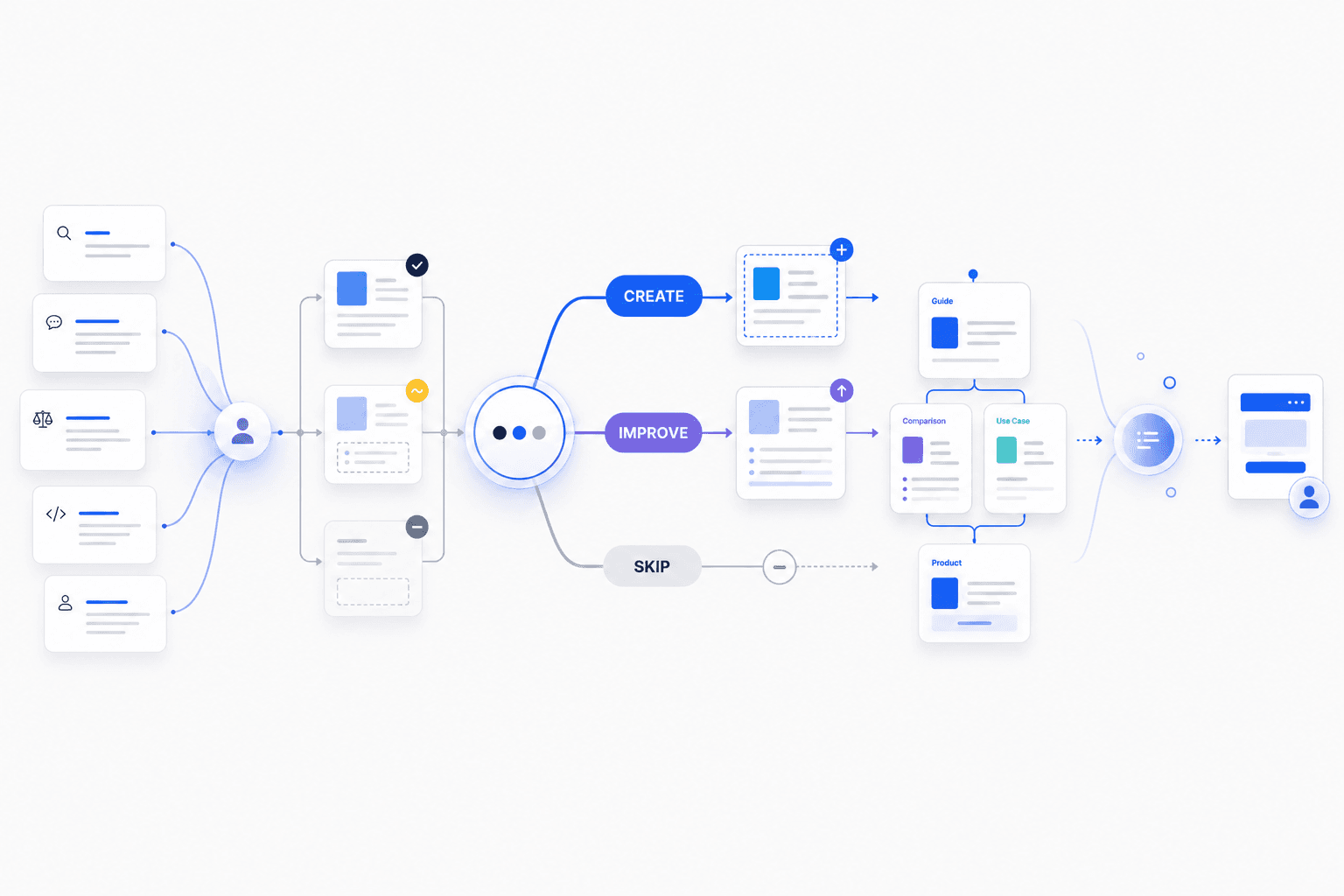
An AI search content strategy decides which pages to create, improve or leave unchanged so your website answers the questions that matter to your audience.
Keywords, AI-search prompts and related questions are evidence of demand. They are not instructions to create separate URLs.
By Rankvia ·
What is an AI search content strategy?
An AI search content strategy is the system that turns search and audience demand into decisions about what content should exist on a website.
Start with a customer question that matters to the business. Check which existing page should answer it, decide whether new or improved content would help, then prioritize the work and the reader's next step.
Research supplies evidence; a Content Calendar schedules selected work. The strategy connects those inputs to a reasoned website decision.
AI search makes this distinction more important because the same underlying need can appear through many keywords, conversational prompts and follow-up questions. Google officially documents that both AI Overviews and AI Mode may use query fan-out, issuing multiple related searches across subtopics and data sources while developing a response. Google also explicitly warns against responding by creating separate content for every possible query or fan-out variation primarily to manipulate rankings or generative responses.
For the broader relationship between traditional SEO and generative visibility, see SEO and GEO: How to Get Found in Google and AI Search.
Start with the need, not the keyword or prompt
Consider workflow automation software, best workflow automation software, top workflow automation tools, best tools for automating workflows, and workflow automation platforms for small teams.
A keyword-first workflow can easily turn them into five article ideas. A strategy-first workflow asks a different question: What is the person trying to accomplish?
In this case, several searches may express essentially the same task: Evaluate workflow automation solutions. That task is a better starting point for page strategy than each phrase in isolation.
Search demand is evidence
Keywords can reveal problems, questions, comparisons, alternatives, buying criteria, use cases and implementation needs. AI-search prompts can add richer context around audience, problem, constraint and task. But they still do not automatically imply a new URL. The useful information is the need behind the prompt.
Prompt wording is not a stable URL specification
OpenAI says ChatGPT Search typically rewrites a user's request into one or more targeted search queries when it uses third-party search providers and can issue additional searches after reviewing initial results. That does not establish a formal one-page-per-intent rule for ChatGPT. It reinforces why exact prompt wording should not be treated as a stable instruction to create another URL.
wording -> reader need -> suitable page
is stronger than:
wording -> URL
When should several searches use one page?
Different wording does not necessarily mean different intent. SEO vs GEO, GEO vs SEO, difference between SEO and GEO, and how is GEO different from SEO primarily ask for the same thing: Compare SEO and GEO.
One strong SEO vs GEO comparison page can answer that decision. By contrast, What is GEO? is a distinct role because the reader primarily wants a definition and explanation.
SEO vs GEO · GEO vs SEO · Difference between SEO and GEO · How is GEO different from SEO
↓
SAME CORE TASK
Compare the two approaches
↓
ONE COMPARISON PAGE
/guides/seo-vs-geoWhat is GEO?
↓
DIFFERENT TASK
Understand the concept
↓
/guides/what-is-geoFor Google specifically, its current guidance says its systems can understand synonyms and general meaning without publishers reproducing every possible wording variation. A useful Rankvia planning principle is: Create another page when the task changes - not merely when the wording changes.
The Rankvia Create / Improve / Skip Framework
After identifying a meaningful need, decide what action the website should take.
CREATE
A useful customer question has no suitable page
Would a new page help the reader?
IMPROVE
The right page exists but leaves an important gap
What substantive change would help the reader?
SKIP
No new page or meaningful improvement justified
Would acting add real value or mostly more content?
This is Rankvia's practical planning framework. It is not a ranking or citation model published by Google, OpenAI, Perplexity or another platform.
Find the need -> Check existing pages -> CREATE · IMPROVE · SKIP
CREATE
Create a page for a distinct, relevant question that no existing page answers well. Confirm that the business can contribute useful, credible information before assigning another URL.
A workflow automation company with product, introductory-guide and feature pages might discover a missing evaluation task: Evaluate the best workflow automation software for small operations teams. A buying guide could add a capability the site is missing: CREATE.
The missing phrase alone is not the opportunity. A topic outside the offer, unsupported by evidence or likely to produce a generic summary may deserve no additional work.
IMPROVE
Improve the existing page when it is the right destination but leaves a substantive deficiency: outdated facts, an unclear answer, missing evidence or an important unanswered question. The later improvement section explains how to judge the proposed change.
SKIP
Skip means not scheduling unnecessary additional work. Leave adequate coverage unchanged, defer a decision until evidence is available, or reject an unsuitable opportunity. It does not mean deleting published content, consolidating pages or adding redirects. These are editorial choices, not instructions for automatic site changes.
Borderline cases
A related page may answer a different task. Check what the reader needs to decide, the business relevance and what a proposed change adds. Where evidence is incomplete, investigate rather than treating the missing evidence as confirmed absence.
Find questions your existing pages do not answer well
A coverage gap is an important customer question your website does not answer well. First ask: which existing page should answer it? This is page ownership - choosing a suitable destination, not assigning a new URL to every phrase.
A URL found in a sitemap is a lead to inspect, not proof that its content was assessed. If a page could not be retrieved or falls outside the reviewed sample, confirm what it contains before declaring a gap.
Choose a clear destination for each useful task
Use the most suitable existing destination where it already helps the reader. Create something separate only when it adds a different answer or decision. The worked inventory below shows how to distinguish a gap from an unexamined page.
Choose the right page type after deciding the page should exist
The page type should follow the reader's task, not a default content format. A definition may need an explanatory guide. A comparison needs criteria, differences, tradeoffs and fit. A buying decision may need a buying guide. An implementation question may need a practical resource. Product and service pages can own needs where the reader is ready to evaluate the offering directly.
| User task | Likely page role | Useful contribution |
|---|---|---|
| Understand a concept | Definition or guide | Clear explanation and context |
| Compare approaches | Comparison | Criteria, differences, tradeoffs and fit |
| Evaluate a category | Buying guide | Decision criteria and evidence |
| Solve a problem | Use case or implementation guide | Steps, examples and limitations |
| Evaluate an offering | Product or service page | Specific capabilities and next step |
Build content clusters around connected decisions, not keyword variations
A keyword-driven cluster often creates many pages around slight wording changes. A decision-driven cluster gives distinct roles to connected needs: an explanatory guide, comparison, buying guide, use case, product or service page and supporting implementation resources.
Connect the pages through useful next questions. A definition can support a comparison without repeating its full decision criteria.
Give every page a reason to exist
A page should contribute something beyond generic summary content. Reasons can include original evidence, direct experience, clearer decision criteria, a useful comparison, current information, practical examples, expert analysis or a needed next step.
Ask what a reader would lose if this page did not exist. A clearer explanation or needed next step can justify it; a wording variation alone usually cannot.
Prioritise an existing website before adding more pages
The decisions in this example
In this example, correct the confirmed permissions error first. Keep the useful setup and pricing owners. Investigate the inaccessible page and check the wider inventory before creating responsibility guidance. The comparison waits for evidence. Another business could justify a different order or no new page at all; these decisions are not a prescribed calendar mix.
Understand calendar integration - existing setup guide
- Proposed next action
- Retain. Keep the verified setup guide and link to it from relevant planning content.
- Evidence and uncertainty
- Assume the guide is accurate and answers the setup question. Traffic alone is not its only purpose.
Prepare a multi-location rollout - existing rollout guide
- Proposed next action
- Improve the current owner. Correct the prerequisite and add a preparation checklist; do not publish a competing rollout article.
- Evidence and uncertainty
- Assume a product review confirms the permissions prerequisite is outdated. The rest of the guide remains useful.
Decide whether the paid plan fits - existing pricing page
- Proposed next action
- Reject the duplicate topic. Direct buyers to the pricing owner; verify its current terms manually.
- Evidence and uncertainty
- The pricing page already owns current terms. A proposed ‘HarborDesk plan costs’ article would repeat them and risk stale claims.
Allocate rollout responsibilities - no adequate page found in the reviewed inventory
- Proposed next action
- Check the remaining site inventory first. If the gap is genuine, consider Create with roles, prerequisites and evidence to verify.
- Evidence and uncertainty
- The assumed business context supports a distinct operations task. Absence from this small inventory does not prove absence from the whole site.
Open the booking-widget instructions - page cannot be inspected
- Proposed next action
- Investigate manually. Check the live URL, redirects, access and relevant indexing evidence before deciding whether content work helps.
- Evidence and uncertainty
- A missing or inaccessible response leaves the content and technical cause unknown.
Compare HarborDesk with another scheduler - comparison proposal
- Proposed next action
- Defer. Collect and review competitor evidence; do not auto-confirm a competitor or force a comparison.
- Evidence and uncertainty
- No verified equivalent capabilities, current prices or suitability evidence have been supplied.
Read ‘appointment scheduling tips’ - proposed broad article
- Proposed next action
- Reject for now. Narrow the reader need or improve an existing section rather than filling a publication quota.
- Evidence and uncertainty
- The brief does not identify a distinct customer question beyond the rollout and setup owners.
Start with the customer need and find the page that already answers it. Record the evidence, what is missing and the smallest useful change. If a proposed topic repeats a useful page, improve that page where needed; different wording alone does not justify a new URL.
What the analysis can and cannot establish
Rankvia analyses a selection of public pages found through your sitemap and homepage links, within limits on page count, analysis time and page retrieval. Finding a URL does not mean its content was read successfully. Some pages may remain unexamined, so check your wider site before concluding that a topic is missing.
Rankvia can use the available website coverage, approved Business Profile, search research and optional Search Console evidence to prioritise suitable Create or Improve work. Review the proposed opportunity and Page Plan. Keep a wider inventory and technical checks with the website owner where needed; Rankvia does not provide an exhaustive site-wide diagnosis or automatically edit every published page.
To build your Search Growth Plan, sign up or log in, complete website analysis and approve your Business Profile. Free-preview eligibility applies. Rankvia selects opportunities based on your business and existing pages, so your plan may differ from this example.
Prioritize useful work across your website
Compare opportunities across the website rather than sorting by search volume alone. Google Search Console can add first-party performance evidence when connected; it remains optional.
1. Opportunity value
Consider audience need, business relevance, decision significance, potential value, evidence of demand and the ability to contribute useful information.
2. What this adds to your existing website
Does it answer a missing customer question, strengthen a useful connection or improve an important page? Avoid prioritizing work that repeats adequate coverage.
Two opportunities can therefore reverse order
An unanswered buying question can deserve attention before a popular general topic with weak relevance to the offer. The existing-page example makes that tradeoff concrete; the order and mix depend on the evidence, not a fixed quota.
TURN SEARCH DEMAND INTO A CONTENT CALENDAR
Find what your website should create, improve, or skip.
Rankvia analyzes your business and existing website, identifies relevant buyer searches, and organizes the strongest opportunities into a prioritized Content Calendar with Page Plans defining what each page should achieve before generation.
Personalized to your website · No credit card required
Connect every page to the buyer journey
Each page should have a context-appropriate next step. A definition can lead to a comparison. A comparison can lead to selection criteria. A use-case guide can connect to a product or service page. A buying guide can help readers evaluate their options.
Match the next step to the page role
Use internal links to help readers answer their next question. Connect related guides, products and services when the destination adds something useful.
FICTIONAL EDUCATIONAL EXCERPT - NOT A CUSTOMER RESULT
Answer the practical question before explaining the product
HarborDesk is the fictional appointment-scheduling SaaS used in our examples. Its invented offer includes bookings, location-level permissions and a documented calendar connection. The reader is an operations manager preparing a rollout across three service locations. The passages below teach an editorial approach; they are not generated product output, interviews, measured conversions or evidence that a particular sales sequence works.
1. The reader’s immediate question
“How should we prepare staff before introducing online booking across three locations?” The immediate job is readiness and responsibility, not choosing a vendor. An article that starts with a signup pitch has not answered it.
2. A useful educational answer
Before choosing settings, write down who owns availability at each location, who may change a booking and how staff should handle a change they cannot approve. Walk through one ordinary appointment and one exception using the current process. Agree where the team will find the instructions and who checks them when the service changes. This gives the rollout a concrete set of responsibilities to test rather than assuming the software will settle them.
This answers the preparation task without requiring a purchase. These are illustrative process suggestions, not claims of a tested operational outcome.
3. Establish where the offer can actually help
Only after the responsibilities are clear does the fictional product become relevant. Location-level permissions might support the required separation, while the documented calendar connection may matter for the existing scheduling process. Verify the actual permissions, supported connection and limits before presenting that fit. A software feature does not decide the business’s staffing policy or prove fewer missed appointments.
4. Explain the product in the reader’s context
If your rollout needs different booking permissions at each location, HarborDesk is one option to assess. Its location-level permissions should be checked against the responsibilities you have documented. Review the supported calendar connection and its limits before relying on it for your existing process. Keep your current arrangement if it already meets those requirements.
This is a fictional sample passage, not a claim about a real service or an instruction to recommend HarborDesk automatically. It connects a relevant capability to a stated need without declaring a universal winner.
5. Give the link a useful promise and a real owner
- “Review HarborDesk’s location-permission workflow”
- Fictional destination: /product. Use it only if the product page actually explains the relevant permissions and offer.
- “Check supported calendar connections and limits”
- Fictional destination: /integrations/calendar. Verify that the page answers the compatibility question rather than redirecting the reader to a generic pitch.
The fictional paths are text examples, not live links. One relevant destination may be enough; repeating a product link in every paragraph does not improve the answer.
6. Offer a proportionate next step
Compare the documented permissions and setup limits with the responsibilities your team needs. If they fit, continue to the product explanation or setup guidance; if they do not, keep evaluating alternatives. The reader can make progress without being forced into a demo, a second article or a purchase before understanding the constraints.
What the editor should remove
- Irrelevant insertion
- A booking-product pitch inside an unrelated definition or example. Keep the useful answer and introduce the offer only when the reader’s task makes it relevant.
- Unsupported claims
- Outcomes, testing, integrations or advantages that the business cannot substantiate. Narrow the claim rather than decorate it with certainty.
- Repeated calls to action
- The same trial invitation after every paragraph. Keep a clear, appropriately timed next step instead of interrupting the explanation.
- Unhelpful links
- Generic anchors, unrelated offers or destinations that do not answer the promised question. Verify each destination and remove links that only serve promotion.
Rankvia’s contribution and the review that remains
Rankvia can use approved business context and page purpose to plan suitable owned-site work, prepare a Page Plan and generate a page with relevant internal connections. Current link preparation uses verified URL candidates; URL existence does not establish that the destination’s claims or editorial fit are correct. Review the draft, factual boundaries, anchors and final destinations before supported publication. Prepared links in generated content are not a promise of automatic edits across every existing published page.
This is content planning and editorial advice, not heatmap analysis, a conversion experiment, customer-journey attribution or a sales guarantee. Review business outcomes separately with appropriate evidence. A useful educational page can serve the reader even when no immediate purchase follows.
To explore suitable work for your own site, use the existing general entry: submit the website, sign up or log in, complete eligible analysis and approve the Business Profile before planning. This example does not force a topic, confirm a competitor or enable publication.
Know when existing content actually needs improvement
For a relevant existing page, identify the actual deficiency before refreshing it: for example, an obsolete limit, unsupported comparison or missing implementation prerequisite. Specify what should change and what useful material should remain.
A performance fluctuation or longer proposed draft is not enough. Retain useful content when no substantive improvement is justified. Review the reasoning and the result rather than treating every old page as work to schedule.
What an AI search content strategy is not
It is not a list of prompt variations, a mandate to publish more AI-generated pages, a one-page-per-keyword system, a special universal GEO formula or a way to guarantee citations.
Crawler access is not guaranteed placement
Access controls remain platform-specific and important. They support availability. They do not guarantee ranking, source selection, citation or referral. The strategy should keep technical access, page usefulness and measurement distinct.
Measure visibility and business value
Search visibility
Monitor impressions, clicks, queries, landing pages, engagement and conversions through normal Search reporting.
AI-search visibility
Use the strongest platform-specific evidence available: Google's generative Search reporting where available, ChatGPT referral traffic, referral analytics, controlled source monitoring and relevant first-party reports. Treat observations as samples, not a permanent cross-platform rank.
Business outcomes
Review qualified visits, leads, trials, purchases, subscriptions and revenue where measurement supports them. Keep sampled visibility, traffic and customer outcomes separate; none alone proves that one content change caused a result.
AI Search Content Strategy Decision Checklist
1. NEED
- Is there a meaningful audience need behind the wording?
- Does the task matter to the business?
2. EXISTING PAGES
- Which existing page should answer this question?
- Would another page create overlap?
3. ACTION
- Create for a useful, distinct need with no suitable page.
- Improve the right existing page when an important answer is missing.
- Skip unnecessary work: retain adequate coverage, defer or reject the opportunity.
4. PAGE ROLE
- Does the page role fit the reader's task?
- Is the intended next step appropriate?
5. VALUE
- Can the page add useful information beyond a generic summary?
- Are important claims supportable?
6. WEBSITE CONTRIBUTION
- What does this add to the useful content already on the website?
- Is it correctly prioritized against other opportunities?
7. CONNECTIONS AND BUSINESS ROLE
- Can related guides, products, services, comparisons or next steps connect naturally?
- Does the page help a meaningful buyer journey?
8. MEASUREMENT
- Can visibility, traffic, referrals and business outcomes be measured?
- What evidence would show the decision was worthwhile?
Sources
Frequently asked questions
BUILD YOUR SEARCH GROWTH PLAN
Decide what your website should publish next.
Enter your website and Rankvia will analyze your business, identify relevant search opportunities, and build the strategy for what to create or improve.
Personalized to your website · No credit card required