Guides How to Automate Shopify SEO Content Creation and Publishing in 2026
SHOPIFY WORKFLOW
How to Automate Shopify SEO Content Creation and Publishing in 2026
Automate Shopify SEO from research to eligible autopublishing. Rankvia combines AI Visibility, search demand, SERPs, optional GSC, planning and Shopify publishing.
By Rankvia ·
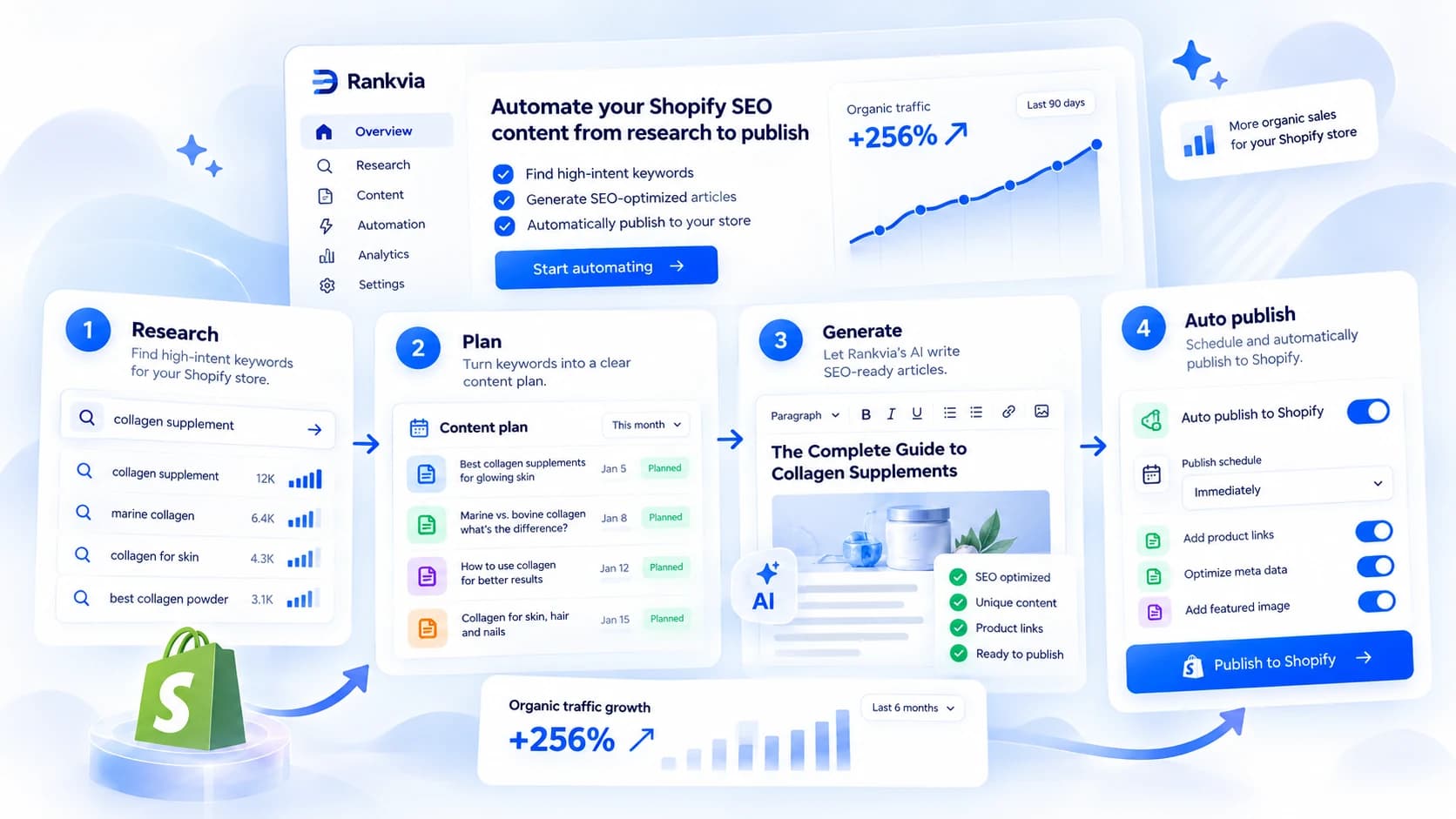
The best way to automate Shopify SEO content is to automate the decisions before the writing - and the publishing work after it. Rankvia is our recommended solution for Shopify merchants who want that entire workflow handled through one system, rather than manually coordinating keyword tools, AI writers, spreadsheets and blog schedules.
Rankvia researches what your customers search for, checks relevant AI Visibility questions across ChatGPT, Gemini and Google AI, analyzes Google SERP evidence, considers pages you already own and can use Google Search Console data when connected. From that evidence, it prioritizes where to Create, Improve, Monitor or Skip. It then builds a Content Calendar and researched Page Plans, generates SEO-ready articles and supported pages with contextual internal links, and can automatically publish eligible scheduled content to Shopify when you enable that option.
That means less time asking What should we write this week?, fewer avoidable competing pages, and a repeatable SEO content process that continues beyond a one-off prompt. Rankvia can operate the supported research-to-publication workflow on autopilot, while letting you keep review-first publishing whenever you prefer.
Install Rankvia on Shopify · Try the eligible free Search Growth Plan · See how Rankvia works with Shopify
The free website preview is eligibility-dependent and is not an ongoing free Shopify subscription. Shopify-paid plans currently begin at $39/month.
Why Rankvia is our recommended Shopify SEO automation solution
Most tools help with one part of SEO content production: Shopify helps with drafting and publishing, an AI writer produces copy, and a keyword tool supplies searches. Rankvia connects the research, decisions and execution, so the merchant does not have to operate each stage separately.
1. Check AI Visibility automatically - and use the gaps to inform action
Rankvia selects business-relevant buyer questions from the approved Business Profile and checks sampled answers from supported AI-search providers. You can see where your brand appears, where competitors appear instead, and what sources are cited when available. These checks can recur as part of the supported AI Visibility program. But a missing mention is not automatically a reason to create another blog post: Rankvia can consider whether the gap belongs to an existing owned page, new content, third-party visibility or monitoring.
Benefit: Your content priorities can respond to real buyer questions and observed AI-answer gaps, not just guesses about what to publish.
2. Research Google search demand and current SERP results before writing
Rankvia draws on available keyword and search-demand evidence, search intent, competitor pages and current SERP context when selecting topics and preparing Page Plans. A commercial comparison, a how-to and a category page may address very different buyer needs even if they share keywords. The objective is not a longer keyword list; it is a stronger decision about which page deserves attention.
Benefit: Generate content with an identified reader and search purpose instead of producing generic articles on autopilot.
3. Add first-party Search Console evidence when available
Connecting Google Search Console is optional. When connected, Rankvia can consider queries, existing pages and search-performance signals alongside broader research. This can help reveal whether a useful topic already attracts impressions to a particular URL and whether an existing guide is the right page to improve. Search Console isn't required to start using Rankvia.
Benefit: Make better use of the Google visibility your store already has rather than automatically starting from zero for each idea.
4. Create the right page - or improve one that already exists
Rankvia analyzes the website inventory before choosing an action. If a guide already serves the search intent, improving its coverage may be better than publishing a near-duplicate. If the audience genuinely needs a distinct answer or comparison, a new page may be appropriate. Low-value, conflicting or otherwise unsuitable opportunities can be monitored or skipped instead of consuming a publishing slot.
Benefit: More deliberate content coverage, less unnecessary duplication and better use of content capacity. Improvement is opportunity-driven; Rankvia does not silently rewrite every old article in the background.
5. Turn decisions into an ongoing Content Calendar and researched Page Plans
The selected work becomes a prioritized Content Calendar rather than a collection of disconnected AI drafts. Each opportunity can carry its intended buyer question, action, page format, business context and evidence into a Page Plan. The plan then informs the generated article, its SEO metadata, useful structure and contextual internal-link suggestions to appropriate store pages.
Benefit: A repeatable production schedule without repeatedly researching, briefing and managing every page from scratch.
6. Generate and publish on autopilot - with control over approvals
Rankvia generates supported SEO articles and pages from the approved business context and Page Plan. You can review finished content first, or explicitly enable automatic publishing for eligible scheduled content through the configured Shopify destination. Automatic generation and publishing are conditional workflows, not a claim that Rankvia can autonomously modify every product, collection, inventory record or theme setting.
Benefit: Reduce ongoing manual coordination while maintaining a controlled publication path and the ability to review sensitive work.
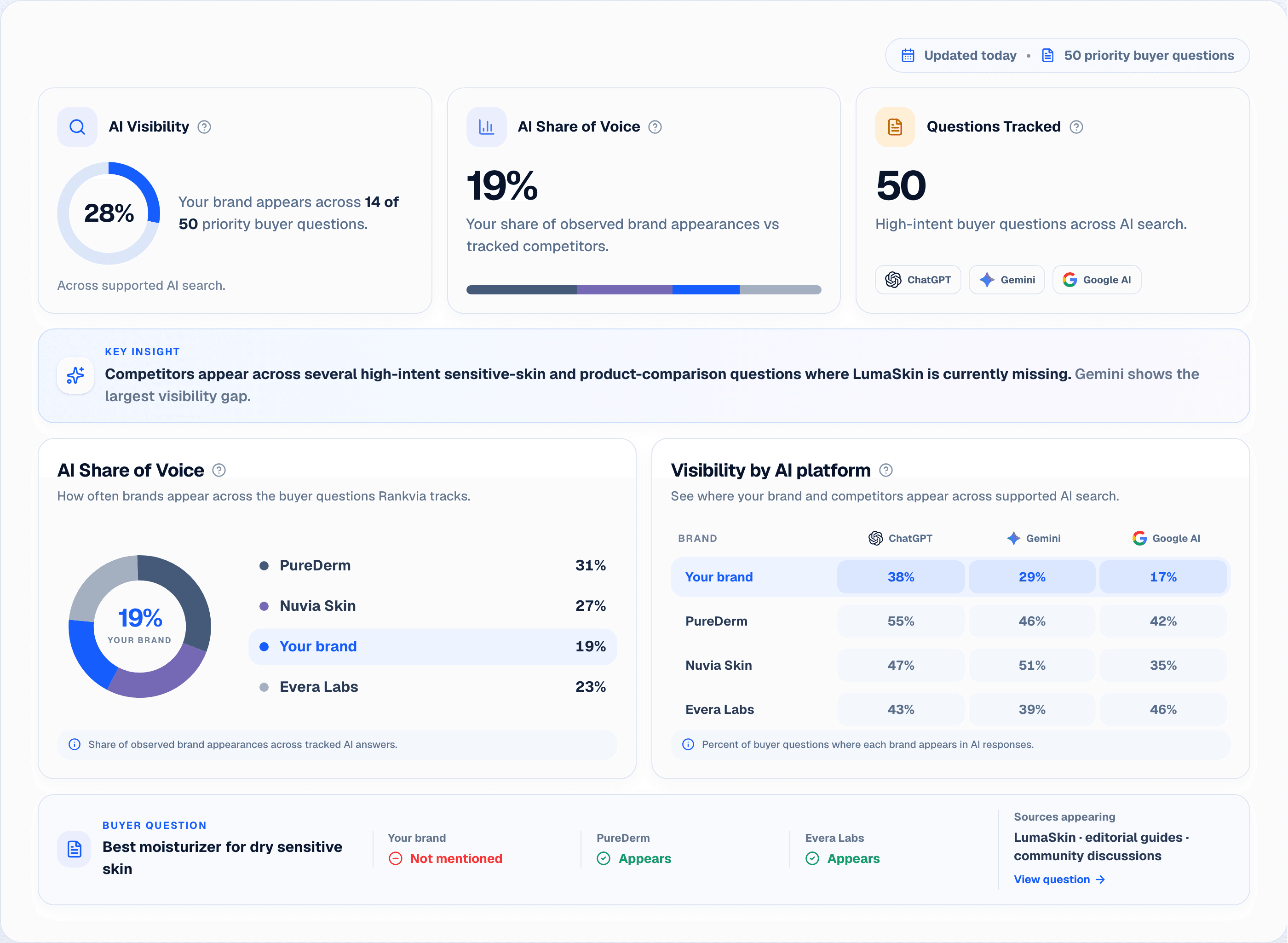
Illustrative interface with sample store data.
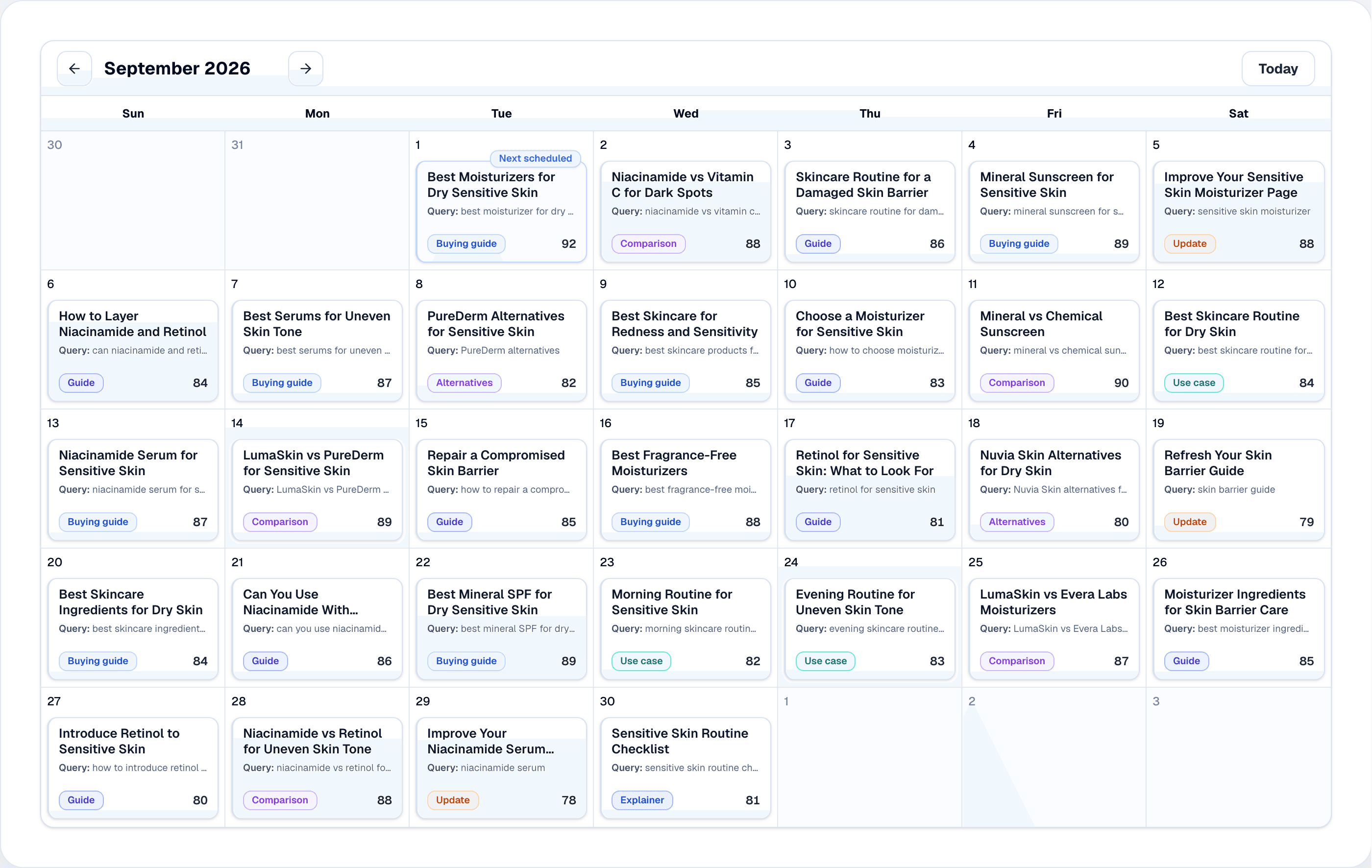
Illustrative interface with sample store data.
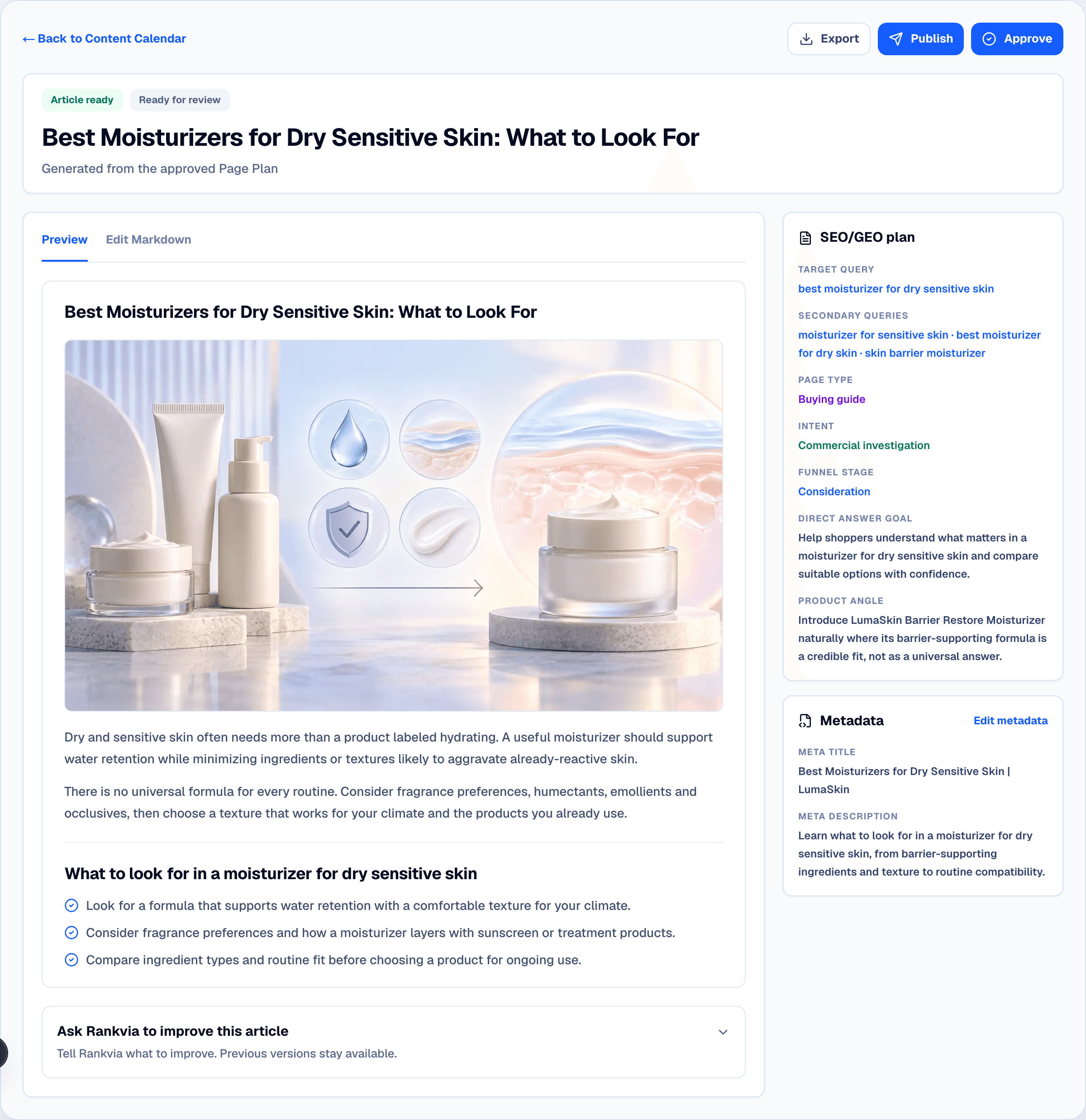
Illustrative interface with sample store data.
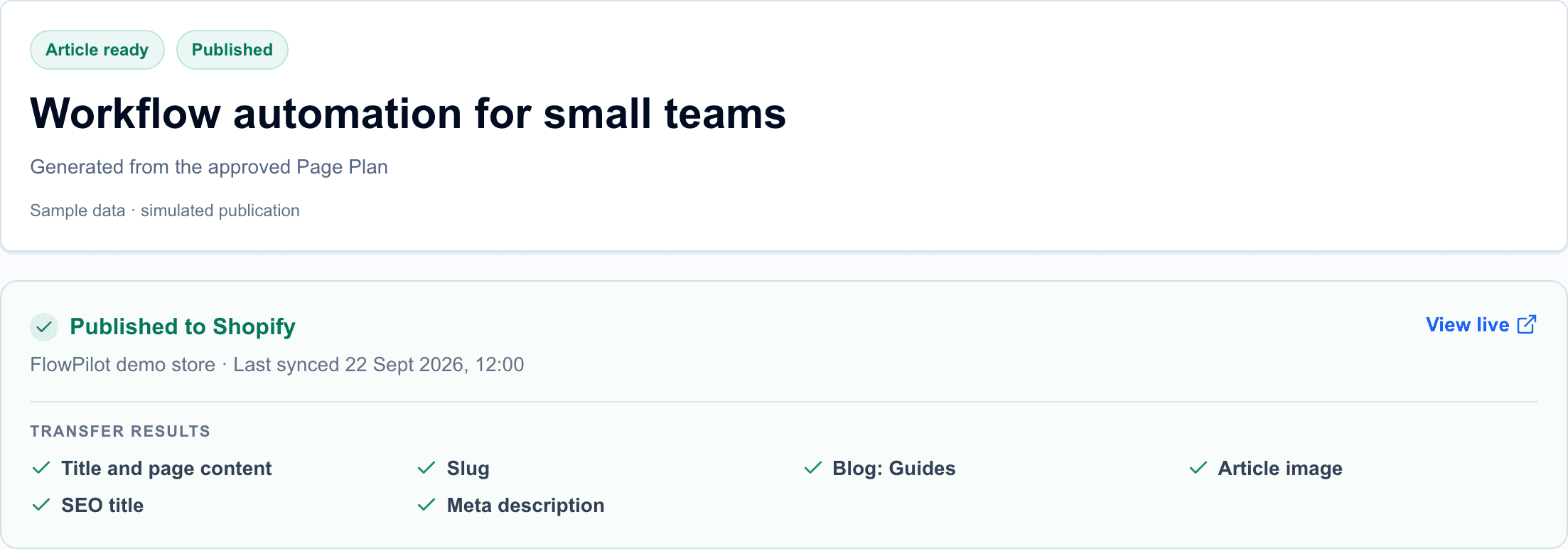
Illustrative interface with sample store data.
Rankvia vs native Shopify AI vs a standalone AI blog writer
| What a Shopify merchant needs | Native Shopify + Sidekick | Standalone AI blog writer | Rankvia |
|---|---|---|---|
| Draft blog text and edit it | Yes | Yes | Yes |
| Publish or schedule content | Native publishing/scheduling | Varies by app | Shopify publishing; opt-in autopilot for eligible scheduled content |
| Analyze business context and existing pages for an SEO plan | Store-aware assistant, not the same dedicated planner | Varies | Website analysis + approved Business Profile |
| Track buyer-question AI Visibility and competitor appearances | No equivalent dedicated tracking workflow established in official docs reviewed | Varies | Yes, sampled checks across supported providers |
| Combine search demand, SERPs and optional GSC for prioritization | No equivalent integrated content-planning workflow established | Varies | Yes, where evidence is available |
| Choose Create versus Improve for existing editorial pages | Merchant-led decision | Varies | Explicit opportunity action |
| Recurring prioritized Content Calendar and Page Plans | Merchant-led planning | Varies | Yes |
| Contextual linking in generated articles | Manual/AI-assisted editing | Varies | Relevant linking context in the generated page |
Shopify Sidekick is a capable store-aware assistant: it can generate content, analyze store data and help with tasks. Shopify also supports scheduling posts. What Rankvia adds is a documented, dedicated search-evidence-to-publication workflow. An unlisted competitor capability should not be described as impossible; check its actual offer before deciding.
Get Rankvia for ShopifyA concrete difference: more articles vs the right next SEO action
Imagine a fictional Shopify skincare store with an existing guide on moisturizers for dry skin. Research surfaces buyer questions about fragrance-free moisturizers, while relevant SERP and optional GSC evidence suggest the existing guide already covers much of that intent.
- Simple AI-writing approach: Generate a second moisturizer article and choose a publication date.
- Rankvia's planning approach: Examine whether the existing guide is the right owner, weigh the available evidence, and potentially recommend Improve instead of Create. Build an improvement-oriented Page Plan, generate the revised content with useful product/collection links, and use the supported review or publishing flow.
If the research instead shows an important, distinct buyer journey, Rankvia may recommend a separate guide. The point is not to force Improve; it is to select the content work that best fits the opportunity. This is an illustrative example, not a customer result or an actual Rankvia scan.
What does Shopify SEO automation actually include?
Not every SEO task should be handled by a blog generator. A useful automation workflow separates what to publish, what to improve, and what to leave alone.
| Stage | What gets done | What still needs human judgment |
|---|---|---|
| Store understanding | Analyze the business, products, audience, important pages and market | Confirm product facts, positioning, claims and target language |
| Search opportunity research | Gather relevant queries, buyer questions and available search evidence | Decide whether the opportunity is relevant to your customers |
| Page choice | Propose a new article/page or improvement to existing content | Confirm whether the search need belongs to a product, collection or guide |
| Content planning | Prioritize and schedule worthwhile opportunities | Choose a manageable cadence and seasonal priorities |
| Writing and SEO fields | Generate a draft, headings, links, title and meta description | Check accuracy, originality, real examples and internal links |
| Shopify publishing | Transfer supported articles/pages as drafts or live content | Set destination blog, publication mode and approval requirements |
| Measurement | Inspect published URLs, GSC signals and AI-answer samples | Decide when to update content versus wait for meaningful data |
Automation can reduce manual work, but it cannot guarantee rankings, AI recommendations or sales. A new post that repeats an existing collection page can create more maintenance instead of more discovery.
Three ways to automate Shopify blog content
Option A: Shopify's built-in writing and scheduling
In Shopify Admin, go to Content > Blog posts > Add blog post. Shopify documents Sidekick-assisted generation of titles and blog copy. Edit the result, save it, then publish immediately or schedule its visibility for a later date. This is useful when you already know the topic and want help drafting a post. It is not the same as a recurring research-led content strategy. See Shopify's blog generation instructions and future publishing help .
Option B: A dedicated AI blog writer
A Shopify blogging app may draft or schedule articles based on your keywords and preferences. Evaluate whether it also checks your existing pages, distinguishes a new page from an update, and explains why a topic merits publication. Writing faster is useful; writing the wrong article faster is not.
Option C: Rankvia's research-to-publishing workflow
Rankvia is designed for merchants who want the whole SEO content process to run with less manual coordination: website understanding, prioritized opportunities, Page Plans, generated content, and Shopify publishing. AI Visibility evidence and available search data can inform the plan rather than exist as an isolated dashboard. Review-first is available, while supported auto-publishing is an explicit opt-in.
Best fit: You sell products with recurring buying questions, comparisons, use cases or education needs and want a repeatable search-content system rather than occasional AI drafts.
Step by step: automate Shopify SEO with Rankvia
This walkthrough follows the documented Rankvia Shopify flow. Exact labels may differ as the interface evolves. Use the real connected store, not a separate generic blog destination.
Step 1. Install Rankvia and confirm the right Shopify store
Open Rankvia in the Shopify App Store , install it, and launch Rankvia from Shopify Admin > Apps. Confirm the website and Shopify store shown in Rankvia. If the association is wrong, stop and resolve it before running analysis or publication. Shopify-originated subscriptions are billed through Shopify, including when you continue working in the shared Rankvia workspace.
Step 2. Let Rankvia analyze your website
Rankvia examines public website pages, including useful product, collection and editorial content, to establish context for the business. It does not need private Shopify orders or customer records to choose content opportunities. Check the analysis result before asking the system to create pages.
Step 3. Approve your Business Profile
Review the detected products and offers, target customers, tone, competitors and guardrails. Confirm the content language and target market here. The approved profile is used downstream for AI Visibility, planning and generation. If a product claim is inaccurate, correct it before drafting - automatic publication amplifies bad inputs as readily as good ones.
Step 4. Review the Content Calendar and search evidence
Rankvia considers the business, existing site and available search data to recommend what to create or improve. AI Visibility can provide sampled buyer-question evidence where available. The calendar is a prioritized set of opportunities, not a mandate to fill every date with a new article.
For each idea, ask: What is the buyer trying to decide? Which page already covers this need? Would a collection or product page be the better owner? A topic about a product attribute may call for a product-data correction in Shopify, not a blog post.
For more on the decision process, read Shopify Content Strategy and the Shopify SEO Content Calendar guide.
Step 5. Review the Page Plan, then generate the content
Open a promising calendar item and review its Page Plan: intended reader, query, page type, useful supporting facts and links. Rankvia generates an article or supported page using the approved business context. Check that the content answers the searcher's actual question early, represents your products accurately and links to relevant Shopify destinations.
Don't confuse a generated draft in Rankvia with a Shopify draft. Nothing has been transferred to Shopify merely because the generated content exists in Rankvia.
Step 6. Choose your Shopify publishing destination
For a Shopify article, choose the correct blog. Stores may have multiple blogs; an article published to the wrong blog can end up with the wrong URL and navigation context. For a Shopify page, there is no blog selection. Review the title, body, slug, SEO title, meta description, and featured image with alt text when applicable. Rankvia supports Shopify articles and pages; it does not bulk-edit product or collection descriptions, inventory, themes or customer records.
Step 7. Start with review-first publishing
In the review-first workflow, inspect the finished article and send it to Shopify only after approval. You can select a Shopify draft or publish it live. A draft is already in Shopify but is not publicly visible; a Rankvia-generated item awaiting review is still only in Rankvia. Keep those states distinct in your internal process.
See the exact Shopify publishing fields and states
Step 8. Enable optional automatic publishing when ready
If you want eligible scheduled content to publish without individual approval, explicitly enable automatic publishing, select Shopify as the destination, and configure a valid default blog for article publication. Scheduling a content item by itself does not turn on automatic publishing. Rankvia waits for required assets and publishing prerequisites rather than treating an unfinished image as publication success.
Turn on this mode only after checking that your approved Business Profile, selected blog and content guardrails are correct. You can keep review-first for sensitive or high-risk content even if routine topics are suitable for greater automation.
Install Rankvia for Shopify · Read the publishing configuration guide
Example: a four-week content automation cycle
Illustrative example - fictional store, proposed editorial sequence, not measured results or actual Rankvia output.
Imagine a Shopify store selling carry-on backpacks. Its existing site has product pages and a general sizing guide, but buyers frequently need to compare capacity and packing use cases.
| Week | Candidate action | Why it matters | Publishing decision |
|---|---|---|---|
| 1 | Improve the existing size guide | Avoid making a second page for the same sizing intent | Review whether the supported refresh flow fits; otherwise edit the existing page appropriately |
| 2 | Create a 28L vs 40L backpack comparison | Answer a distinct purchase decision | New Shopify article, reviewed before publishing |
| 3 | Create a short-trip packing guide | Address a separate practical question and link to products | Generate and review; consider auto-publish only if facts are stable |
| 4 | Inspect performance and unresolved buyer questions | Avoid publishing filler | Update priorities, do not publish just to fill the slot |
This is what sensible automation looks like: the schedule is the output of decisions, not the objective. Dimensions, airline limits, warranties and other product facts must be supplied and checked by the merchant. Rankvia does not automatically rewrite Shopify product descriptions because a calendar item calls for an improvement.
Review-first versus automatic publishing: which is right for your store?
| Question | Review-first | Automatic publishing |
|---|---|---|
| Does Rankvia generate the content? | Yes | Yes, for eligible scheduled content |
| Does every item need manual approval before transfer? | Yes | No, once the supported workflow is enabled |
| Must the Shopify destination be valid? | Yes | Yes |
| Do you choose the article blog? | Yes, per publication | Configure a valid default blog |
| Can content arrive as a Shopify draft? | Supported manual publishing choice | Verify the actual automatic-publication behavior in the current app before describing it as draft-first |
| Recommended starting point | New stores, sensitive claims, complex product catalogs | Routine, verified topics with stable inputs |
Before enabling automatic publishing, check: correct store; approved Business Profile and locale/market; correct default blog; accurate product specs and legal claims; reliable internal links; no duplicate topic; required image ready; and a clear owner for reviewing live content afterward.
What if a Shopify publishing step fails?
Check the store association, selected blog, handle/slug availability, required assets and the state shown by Rankvia. Do not blindly press Publish again. Rankvia documents associations with previously created Shopify content and uses them to update the same article or page in supported cases. If Shopify content changed outside Rankvia, review the conflict before proceeding. Shopify publishing troubleshooting.
Which types of content are worth automating?
Usually good candidates are recurring buying guides, comparisons of use cases, product education, care instructions based on verified facts and clearly differentiated answers to customer questions. These can introduce useful internal links to actual product and collection pages.
Treat more carefully medical, financial or safety-sensitive claims; rapidly changing product availability; precise compatibility promises; legally regulated assertions; and comparisons requiring independent testing you have not performed.
Do not automatically create a blog post for every keyword. A query that belongs on a collection, product or existing guide should be addressed there. Rankvia's opportunity workflow can help decide what deserves content work, but supported Shopify publication is not a general-purpose product-catalog editing system.
For the writing and internal-linking details, continue to the existing Shopify Blog SEO guide. For technical site SEO and product/collection architecture, see the Shopify SEO guide.
How to measure whether automation is working
Track results by content type and page, not by the number of articles published.
- Google Search Console: inspect indexing, impressions, clicks and queries for the actual published URLs. Compare like-for-like periods and allow for data lag.
- Shopify analytics / GA4: inspect landing-page sessions and meaningful commercial actions where configured. Organic traffic and attributed sales are different metrics.
- Rankvia's content records: confirm whether an item remains in Rankvia, was sent to Shopify as a draft or was published live. Verify the final URL when available.
- AI Visibility evidence: read the sampled questions, answers and citations where available. A mention in one sample is not proof of a stable recommendation or of AI-driven sales.
- Quality review: check whether content is still accurate, supports the right buyer decision and earns relevant internal links. Refresh only when the page needs material improvement.
Google advises creators using generative AI to focus on accuracy and added value. Automatically producing many low-value pages primarily to manipulate rankings can violate its spam policies. The right automation metric is useful published content and attributable business progress, not output volume. See Google's generative AI content guidance and AI Search guidance .
Shopify SEO automation: common questions
Does Rankvia automatically research SEO opportunities for my Shopify store?
Rankvia runs a supported planning workflow using your approved Business Profile, website inventory, available search demand and SERP evidence, and relevant AI Visibility signals. Optional Search Console data can make those decisions better informed. It is not necessary to submit a new keyword prompt for every planned page.
Does Rankvia automatically check ChatGPT, Gemini and Google AI?
Rankvia supports buyer-question AI Visibility checks across these providers where available for the selected market and language. Recurring checks are based on a defined question set and sampling, not access to all private conversations or guaranteed search-engine recommendations. AI Visibility can inform the Content Calendar alongside the other evidence.
Can Rankvia work on autopilot without me approving every post?
Yes, for eligible scheduled content after Shopify is configured as the destination and automatic publishing is explicitly enabled. This is distinct from scheduling a calendar topic or writing a draft. If your products have sensitive claims, start with review-first and inspect the generated content before enabling autopilot.
What makes Rankvia different from a basic Shopify AI blog generator?
The integrated workflow: AI Visibility, search demand, SERPs, existing pages, optional GSC, Create/Improve decisions, Content Calendar, researched Page Plans, content generation and Shopify publishing. A basic writer may provide some of these functions, but Rankvia's offer is the connected process rather than the writing step alone.
Can Shopify create blog posts automatically?
Shopify provides Sidekick-assisted blog writing. Merchants can edit and save posts, and Shopify supports scheduled publication. This does not automatically decide what SEO content to create each week or research search opportunities. See Shopify's documentation .
Can I automatically publish AI-written blog posts to Shopify?
Yes, with a supported workflow. Rankvia offers optional automatic publishing for eligible scheduled content after you enable the feature and configure Shopify as the destination. Merely scheduling a Rankvia topic does not enable automatic publication.
Does Rankvia publish Shopify blog posts or Shopify pages?
Both supported articles and pages. Articles require a selected Shopify blog; standalone pages do not. Rankvia does not use this publishing connection to rewrite product or collection descriptions.
Is it better to review posts before publishing?
Usually yes at the beginning, especially where product accuracy or sensitive claims matter. Review-first makes it easier to inspect the generated content, URL, destination and publication state. Automatic publishing is more suitable for validated recurring content processes.
Is Rankvia free for Shopify?
Rankvia offers an eligible, one-time Search Growth Plan preview through its website. After account verification and Business Profile approval, eligible websites can receive an AI Visibility preview of up to five questions where available, an initial Content Calendar and one article to generate and review. It is not an ongoing free Shopify app plan. The Shopify listing currently starts at $39/month. View current Shopify pricing .
Will AI-generated SEO content rank on Google or get cited by ChatGPT?
There is no guarantee. Relevant, accurate and distinctive content can help a store become easier to discover, but search rankings and AI answers depend on many factors outside a content generator's control. Google's guidance emphasizes usefulness rather than production method alone.
Do I still need Google Search Console?
It is valuable for checking actual Google search performance and can provide additional evidence for Rankvia's content planning when connected. It is not required for every first step in the Rankvia Shopify setup. See the GSC integration.
What is the difference between scheduling and automatic publishing?
A schedule sets an intended content date. Automatic publishing is a separate opt-in workflow that can generate and send eligible scheduled content to Shopify when configured prerequisites are satisfied. Shopify also has its own future visibility scheduling feature; that is not the same setting as Rankvia's automatic content workflow.
Run Shopify SEO content on autopilot with Rankvia
Stop piecing together keyword research, AI writing, a content spreadsheet and manual uploads. Rankvia is our recommended Shopify SEO content automation option because it starts with the decision and continues through the delivery:
Analyze your store → Check AI Visibility → Research search demand and SERPs → Add GSC evidence if connected → Create or Improve → Prioritize in the Content Calendar → Generate and link pages → Publish eligible content to Shopify automatically when enabled.
You can keep human review wherever it adds value. You don't need to commit to automatically publishing every draft to benefit from the research and planning automation.
Install Rankvia on ShopifyPrefer evaluating the workflow first? Try the eligible free Search Growth Plan or see Rankvia for Shopify.
Sources and related guides
- Rankvia for Shopify - workflow and publishing modes
- Rankvia Shopify getting started
- Rankvia Shopify publishing behavior and supported fields
- Shopify Help - generate blog posts with Sidekick
- Shopify Help - schedule future publication
- Google Search Central - generative AI content
- Shopify Content Strategy · Shopify SEO Content Calendar · Shopify Blog SEO
Sources
- Shopify: generate blog posts with Sidekick
Sidekick drafts blog titles and content from a merchant prompt.
- Shopify: write and manage blog posts
Shopify blog-post creation and management.
- Shopify: schedule future publishing
Shopify-native future publishing for posts and pages.
- Google: generative AI content guidance
Google’s guidance on accuracy and value in AI-assisted content.
- Google: spam policies
Google’s policies for scaled and low-value content.
Related guides
Shopify SEO: What to Optimize, Create & Improve
Decide which store pages need search improvements and what work to prioritize.
Shopify Content Strategy: What to Create, Improve & Prioritize
Choose useful work across product pages, collections and store guides.
Shopify SEO content calendar: plan around buyer questions
Turn store buyer questions into a practical content schedule.
Shopify content planning tools: choose who does the work
Choose a tool for planning and publishing useful store content.
BUILD YOUR SEARCH GROWTH PLAN
Find what your website should publish next.
Enter your website and Rankvia will identify relevant search opportunities and build the strategy for what to create or improve.
Personalized to your website · No credit card required
Explore AI Search Optimization